A progressive web app already does a lot of what an app does. People can add it to their home screen, open it full screen and get push notifications from it, all without visiting an app store.
But an app store is where most people go looking for apps. “Users naturally look for apps in the app store,” as Microsoft’s guide to publishing PWAs puts it, and a PWA isn’t in any store until you package it for one. Each store has its own rules for that package, and Apple’s are the strictest.
This guide covers how to publish a PWA to Google Play, the Microsoft Store and Apple’s App Store in 2026: the tools that package it, what each store asks for and what usually happens in review.
Which App Stores Accept PWAs?
Google Play and the Microsoft Store both accept PWAs, as long as you package them in the format each store expects. Apple’s App Store doesn’t accept PWAs at all, so the only way in is a native iOS app that does more than show your website.
The team behind PWABuilder, the open-source packaging tool from Microsoft, says it plainly in its FAQ: “Unlike Google Play and Microsoft Store, Apple’s App Store doesn’t natively support PWAs.”
Here’s how the three stores compare in 2026.
| Google Play | Microsoft Store | Apple App Store | |
|---|---|---|---|
| Accepts PWAs? | Yes, as a Trusted Web Activity | Yes, as a Windows app package | No, only native iOS apps |
| How it works | An Android app that opens your PWA full screen in the person's browser, usually Chrome | A Windows package that runs your PWA in Microsoft Edge | A native app that shows your PWA in a web view and has to pass Guideline 4.2 |
| Packaging tools | Bubblewrap, PWABuilder | PWABuilder | PWABuilder (experimental) or Capacitor, plus native work in Xcode |
| What you need | A Digital Asset Links file on your site and a $25 developer account | A Partner Center developer account, free to open | A Mac with Xcode 26 and a $99 a year Apple Developer Program membership |
| Website updates | Live without a new release | Live without a new release (manifest changes need a new package) | Live without a new release (changes to the app itself go through review) |
| Review | Standard Play review; new personal accounts need a 14-day closed test first | Typically 24 to 48 hours | 90% of submissions in under 48 hours; Apple rejects apps that are only a repackaged website |
The packaging itself is the easy part. Each tool starts from your site’s address and its web app manifest, and gives you a file the store will accept. Most of the work is in meeting what each store checks before it lists the app.
How Do You Publish a PWA on Google Play?
You publish a PWA on Google Play by packaging it as a Trusted Web Activity, an Android app that opens your site full screen in the person’s browser. Google supports this route officially, and its own tools do most of the setup.
The process takes four steps:
- Make sure your PWA meets Chrome’s install criteria: HTTPS and a web app manifest with your app’s name, icons and start URL.
- Package it with Bubblewrap or PWABuilder, which gives you an Android App Bundle (.aab) to upload.
- Publish a Digital Asset Links file on your site, so Android knows the app and the site belong together.
- Upload the bundle in Play Console, complete your store listing and send it for review.
What Is a Trusted Web Activity?
A Trusted Web Activity (TWA) is Google’s way of opening a PWA inside an Android app, using the person’s own browser to show it. Chrome has supported TWAs since version 72 in early 2019, according to Android’s developer documentation, and other browsers can support the same protocol.
Your site runs full screen with no address bar, and it looks exactly as it does in Chrome. The browser also updates separately from your app, so your PWA always runs on a current engine without you shipping an update.
That’s the main difference from a webview app, where the browser engine is built into the app itself.
The trade-off is that the Android side of a TWA is little more than a frame. It can’t reach your site’s cookies or local storage, and each screen comes either entirely from the web or entirely from native Android code.
Packaging Your PWA with Bubblewrap or PWABuilder
Two free tools build the Android package for you. Both start from your web app manifest, and PWABuilder uses Bubblewrap behind the scenes.
| Bubblewrap | PWABuilder | |
|---|---|---|
| Made by | Google Chrome Labs | Microsoft, as an open-source project |
| How you use it | A command-line tool you install from npm | A website: enter your PWA's URL, then Package for stores |
| What you need | Node.js 18 or later, JDK 17 and the Android command-line tools (it offers to download them) | A browser and your PWA's public URL |
| What you get | A signed APK for testing and an .aab for Google Play | A zip with the .aab, your signing details and an assetlinks.json file |
| Optional features | Notification and location delegation, Google Play Billing | The same, plus Microsoft Store and iOS packages |
| Best suited to | Developers who want the build in their own pipeline | Teams that want a guided setup with no local tools |
Bubblewrap’s current release, version 1.27.0 from October 2026, targets Android 16, the version Google Play now requires for new apps and updates.
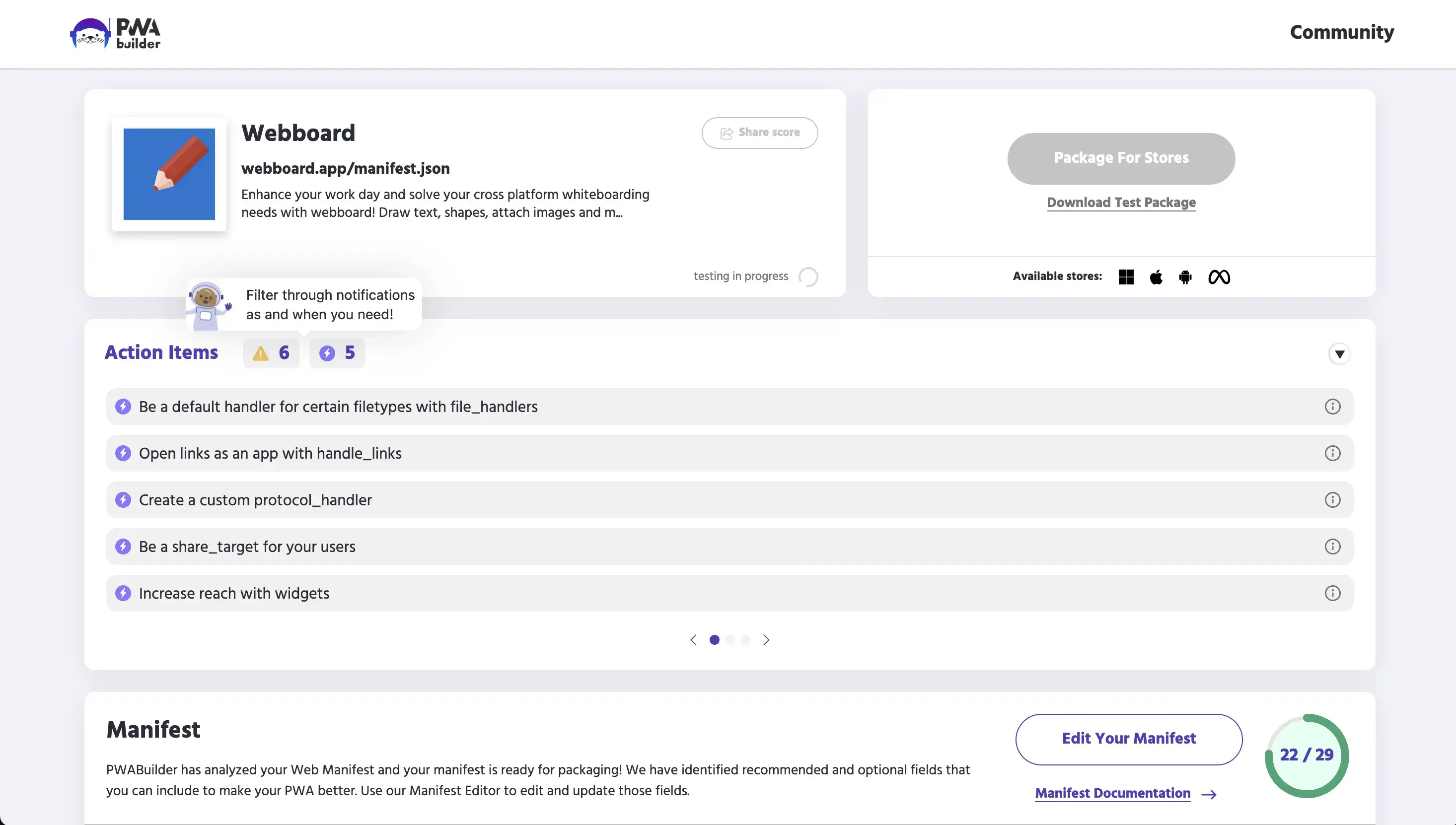
PWABuilder also checks your PWA before it packages anything. Its report card scores your manifest and lists action items, like adding share targets or file handlers.
Proving You Own the Site with Digital Asset Links
Digital Asset Links is how Android confirms that your app and your website come from the same owner. You publish a small file at /.well-known/assetlinks.json on your domain, listing your app’s package name and the SHA-256 fingerprint of the key that signs it.
If the file is missing or wrong, the app shows a browser address bar across the top or can crash on launch, according to PWABuilder’s Google Play guide. Android falls back to a Custom Tab when it can’t verify the link.
The usual cause is the signing key. Google Play re-signs your app with its own key when you upload it, so copy the SHA-256 fingerprint from Play Console (under Setup, then App integrity) into your assetlinks.json after the first upload.
Google Play’s Rules for Packaged PWAs
A packaged PWA goes through the same Google Play review as any Android app. A few rules tend to catch web teams out:
- New personal accounts test first. Personal developer accounts created after November 13, 2023 need a closed test with at least 12 testers, opted in for 14 days in a row, before the app can go live.
- Apps must target Android 16. Since August 31, 2026, new apps and updates must target API level 36, so rebuild older packages with a current version of Bubblewrap or PWABuilder before their next update.
- Digital goods use Play Billing. If you sell digital goods or subscriptions in the app, Google Play requires its own billing, which a TWA reaches through the Digital Goods API. Physical products keep your normal checkout.
- PWAs can’t target children. PWABuilder warns that PWAs on Android can’t currently target children, so set your app’s target audience to 13 and older.
- Web errors count as crashes. Google treats a Digital Asset Links failure at launch, an offline request that doesn’t return a page and a 404 or 5xx error as app crashes in a TWA, according to web.dev. Your service worker should handle all three.
Google’s Webviews and Affiliate Spam policy also bans apps that show someone else’s website without permission. Your Digital Asset Links file is the proof that the site is yours.
Can You Publish a PWA to the Microsoft Store?
You can publish a PWA to the Microsoft Store with no code changes, according to Microsoft’s Edge documentation. It’s the simplest of the three stores, and it’s ideal for web apps people use on Windows desktops and laptops.
Here’s how it works:
- Open a developer account in Partner Center. New individual and company accounts have no registration fee.
- Reserve your app’s name under New product, then MSIX or PWA app, and copy its Package ID, Publisher ID and Publisher display name.
- Enter your PWA’s URL in PWABuilder, choose Windows and paste in those three values.
- Upload the .msixbundle and .classic.appxbundle files it generates, then submit.
Microsoft says review typically takes 24 to 48 hours. After that, changes to your website reach Store users the next time they open the app.
You only need a new package when your web app manifest changes, for example a new icon, a new name or a new feature like a share target.
Can You Publish a PWA to Apple’s App Store?
You can’t publish a PWA to Apple’s App Store as a PWA. The store only takes apps built in Xcode, and since April 28, 2026 they have to be built with Xcode 26 and an iOS 26 SDK, according to Apple.
What you can do is build a native iOS app that shows your PWA in a web view, then submit that. Whether Apple approves it depends on what the app adds.
Without the App Store, a PWA reaches iPhone users through Safari’s Add to Home Screen, with its own limits on iOS.
What Guideline 4.2 Means for a Packaged PWA
Guideline 4.2, Minimum Functionality, is the rule a packaged PWA has to clear. It says an app should include “features, content, and UI that elevate it beyond a repackaged website,” and a PWA in a web view starts out as exactly that.
Apple doesn’t ban web views. Its Guideline 2.5.6 even requires apps that browse the web to use WebKit, the engine a web view on iPhone uses. What Apple rejects is an app that gives people nothing they couldn’t get from your site in Safari.
So the question in review is what the app adds. Native navigation, screens designed for the phone, push notifications and features that use the device all count. Our breakdown of Apple’s Guideline 4.2 for webview apps goes through what reviewers look for, rule by rule.
What PWABuilder’s iOS Package Gives You
PWABuilder’s iOS package is a native Swift app with a web view that loads your PWA, which you finish and submit yourself. PWABuilder labels iOS packaging as experimental, and its App Store guide says acceptance “depends only on UI/UX of your PWA and usage of native capabilities.”
To use it, you need:
- A Mac with Xcode, since Xcode only runs on macOS (PWABuilder suggests cloud build services if you don’t have one)
- An Apple Developer Program membership, at $99 a year
- Time in Xcode to install dependencies, create signing certificates and a provisioning profile, then archive and upload the app
What you get is close to your website in a frame. Push notifications are off by default, because the Firebase Cloud Messaging code in the project is commented out, so you set up push yourself. In-app purchases through Apple’s StoreKit 2 are possible with more manual steps.
That’s a fair starting point for a developer who plans to build on it. Teams that want to go further can use a framework like Capacitor (version 8 in 2026), which runs web code inside a native iOS app and adds plugins for push notifications, the camera and other device features.
What Usually Happens in App Review?
A packaged PWA usually gets a quick answer from App Review, since Apple says 90% of submissions are reviewed in under 48 hours. If the app is little more than your website, expect a rejection citing “Guideline 4.2 - Design - Minimum Functionality.”
The rejection typically says the app isn’t sufficiently different from browsing the web on a phone. You can reply, add what’s missing and resubmit, or appeal to the App Review Board, but each round means another wait.
Apps built from websites pass review all the time. The ones that do are designed as apps: a native tab bar instead of the site’s menu, no browser errors or dead ends, features like push and a working demo login for the reviewer.
Does a Store Listing Make Your PWA an App?
A store listing changes where people find your PWA, not what it can do. A packaged PWA still runs on the browser’s engine, so it has the same features and limits as your website, plus whatever the package adds.
Here’s how a PWA packaged for the stores compares with a native app.
| PWA packaged for the stores | Native app | |
|---|---|---|
| What people download | A small app that opens your website | An app built for iOS or Android |
| Navigation | Your website's own menus and pages | Native tab bars, headers and gestures |
| Push on Android | Web push, shown as the app's notifications through notification delegation | Native push |
| Push on iPhone | Not set up in PWABuilder's package; a developer adds it in Xcode | Native push |
| Device features | What the browser supports | Full access to the phone |
| Updates | Website changes go live at once | New versions go through app store review |
| Cost | Free tools plus your developers' time | The highest: a second product to build, staff and maintain |
For plenty of web apps, that’s fine. An internal tool, a B2B dashboard or a utility that people open from a link doesn’t need much more than a store listing.
A business that wants an app to bring customers back needs more. The gaps that matter most are push notifications on iPhone and an experience designed for the phone, and they’re the same gaps App Review looks for.
Which Route Fits Your Business?
The right route depends on where your users are and what you want the app to do. Packaging is a strong fit when the store listing is the goal in itself; a native app is the better fit when the app has to earn a place on people’s phones.
| Your situation | Best route |
|---|---|
| Most of your users are on Android, or it's an internal tool | Google Play, as a Trusted Web Activity |
| People use your web app on Windows desktops and laptops | The Microsoft Store, packaged with PWABuilder |
| You need an App Store listing and have iOS developers to build on it | A native iOS app around your PWA, starting from PWABuilder or Capacitor |
| You want customers to come back through an app on iPhone and Android | A native app, with native navigation and push |
| Your app needs connected hardware, heavy offline use or features your site doesn't have | A fully custom native build |
Compared with building a native app, packaging a PWA for Google Play and the Microsoft Store costs very little, so it’s worth doing whenever those stores matter to your users. For iPhone, a thin package rarely gets you far, either in review or with customers.
Launching a Native App in Both Stores with MobiLoud
A native app has always been the dependable way into both app stores. Its biggest downside is the cost of building and running a second product, with its own code and its own team, next to your website.
MobiLoud transforms your website into a custom native app, powered by the same underlying code as your website. We build the app from your existing site, building a custom native experience around it for the phone.
Your app uses your site’s products, menus, content and features, from search to loyalty and subscriptions, with a fully custom native interface. On top of that come the things a website can’t do, like push notifications on iPhone and Android and app-only pages your team builds in your own platform. Native features, SDKs and device integrations go in where you need them.
The app can look and feel very different from your website, but it feeds from the same codebase, so it always stays consistent with your site. It launches with everything you’ve already built, then goes where a browser can’t.
That’s the kind of app App Review is looking for, designed as an app from the first tap. Our team builds, launches and looks after your app, from the App Store and Google Play listings to updates as iOS and Android change, so there’s nothing for your team to maintain.
"We have a small team, with no app development experience. We needed someone that would hold our hand through the process, and guide us on how to maintain the app post-launch."
We’ve helped brands like John Varvatos, Jack & Jones and Tadashi Shoji launch their apps this way, typically in 2 to 4 weeks.
Final Thoughts
Publishing a PWA to the app stores is two different jobs. Google Play and the Microsoft Store will list your PWA once it’s packaged correctly, and free tools from Google and Microsoft do most of that work.
Apple’s App Store is the exception. It lists apps, not websites, so a PWA only gets in as part of a native app that gives people more than your site already does.
If a listing is all you need, package your PWA for Android and Windows and keep it on the web for iPhone users. If you want an app your customers keep on their phones, on iPhone as much as on Android, build it as an app from the start.