Apple’s App Review team turned down more than 2 million app submissions in 2025, according to Apple. Over 1.2 million of them were brand-new apps, not updates.
Every rejection costs days. You fix the problem, resubmit and wait in the queue again, while your launch date slips and the campaign planned around it waits too.
Plenty of those rejections come down to rules that are published in advance. But the rules change every year, and Apple and Google don’t ask for quite the same things.
This guide sets out the App Store and Google Play requirements for 2026, side by side: developer accounts and fees, technical minimums, privacy disclosures, account rules and review times, plus the pitfalls that most often send an app back.
The iOS App Store vs Google Play Store
Apple’s App Store and Google Play are the two app stores that matter for most brands. There are others, but any ecommerce brand launching an app should plan to be on these two at a minimum.
The core principles of getting approved are much the same on both. Apple is generally considered the stricter reviewer, while Google has added more steps before a new account can publish at all.
Here’s how their requirements compare in 2026.
| Apple App Store | Google Play | |
|---|---|---|
| Developer account | Apple Developer Program | Google Play Console |
| Fee | $99 a year | $25 once |
| Account types | Individual or organization | Personal or organization |
| Companies also need | A D-U-N-S Number, a public website and a work email on the same domain | A D-U-N-S number, a website and verified contact details |
| Build requirement | Built with Xcode 26 and an iOS 26 SDK | Targets Android 16 (API level 36) |
| Privacy disclosures | App Privacy details and a privacy manifest | Data safety form |
| Privacy policy | Required for every app | Required to complete the Data safety form |
| Account deletion | In the app, if people can create an account | In the app and through a web link, if people can create an account |
| Age rating | Apple's questionnaire: 4+, 9+, 13+, 16+ or 18+ | IARC questionnaire, with local ratings in each region |
| Testing before launch | Optional, through TestFlight | A closed test with 12 testers for 14 days, for new personal accounts |
| Review time | 50% in under 24 hours, 90% in under 48 hours | Up to seven days, or longer in exceptional cases |
| Payments for physical goods | Your own checkout, not In-App Purchase | Your own checkout, not Google Play Billing |
What Changed for App Submissions in 2026?
App store requirements tightened in 2026 for build tools, age ratings and Android developer identity. These are the dates to know.
| Date | Store | What changed |
|---|---|---|
| January 31, 2026 | App Store | Deadline to answer Apple's updated age rating questions, or app updates are held up |
| April 28, 2026 | App Store | New uploads must be built with Xcode 26 or later, using an SDK for iOS 26 or another 26 release |
| August 31, 2026 | Google Play | New apps and updates must target Android 16 (API level 36) |
| September 9, 2026 | App Store | iPhone and iPad apps must target iOS 13 or later |
| September 30, 2026 | Android | Developer verification starts protecting users in Brazil, Indonesia, Singapore and Thailand |
| November 1, 2026 | Google Play | Last date for apps granted an extension to the Android 16 deadline |
| February 1, 2027 | Google Play | Updates to apps targeting Android 15 or higher can't be released unless they support 16 KB memory pages |
| 2027 | Android | Developer verification expands worldwide |
Android developer verification covers apps installed on certified Android devices, from Google Play and other stores. If you publish on Google Play, Google says Play registers 99% of apps automatically, so most Play developers have little to do.
Apple has also added Accessibility Nutrition Labels, which show on your App Store page which accessibility features your app supports. They’re voluntary for now, but Apple says they’ll become required for new apps and updates over time.
What Developer Account Do You Need?
To publish an app, you need a developer account with each store: the Apple Developer Program for the App Store and a Google Play Console account for Google Play. Both let you register as a person or as a company.
Apple Developer Program
The Apple Developer Program costs $99 a year, and prices may be shown in local currency in some regions. Nonprofits, accredited educational institutions and government entities can request a fee waiver.
You can enroll as an individual or an organization. An organization must be a legal entity that can sign contracts with Apple, with a D-U-N-S Number, a public website on its own domain and a work email address at that domain.
Apple doesn’t accept DBAs, trade names or branches. Individuals enroll with an Apple Account in their legal name, with two-factor authentication turned on.
If you distribute apps in the EU, you also need to declare your trader status under the Digital Services Act. Since February 17, 2025, apps without it have been removed from the EU App Store until it’s provided and verified.
The $299-a-year Apple Developer Enterprise Program is something else. It’s best suited to companies distributing private apps to their own employees, and it doesn’t publish on the App Store.
Google Play Console
A Google Play developer account costs a one-time $25 fee. You must be at least 18, and Google verifies your identity and contact details before you can publish.
Organization accounts need a D-U-N-S number and a company website and phone number. Google also verifies your contact details with one-time passcodes. D-U-N-S numbers are free from Dun & Bradstreet, but getting one can take a few days or weeks, so start early.
Personal accounts have extra hurdles. New ones must prove they have access to a physical Android device.
Personal accounts created after November 13, 2023 must also run a closed test with at least 12 testers for 14 days before they can publish. Our guide to beta testing Android apps explains how that test works.
For a brand, an organization account is the better choice on both stores. It puts your company’s name on the listing, lets your team share access and doesn’t depend on one employee’s personal account.
Which Xcode Version and Android API Level Do You Need?
Apple and Google both set technical minimums for every new app and update, and both raise them every year. These are the rules in 2026.
On the App Store:
- Since April 28, 2026, apps uploaded to App Store Connect must be built with Xcode 26 or later, using an SDK for iOS 26 (or iPadOS, tvOS, visionOS or watchOS 26).
- Since September 9, 2026, iPhone and iPad apps must target iOS 13 or later.
On Google Play:
- Since August 31, 2026, new apps and updates must target Android 16 (API level 36). Developers who need more time can request an extension to November 1, 2026.
- Existing apps that don’t target at least Android 15 (API level 35) are no longer offered to new users on newer Android versions. People who already have the app keep it.
- New apps must be published as an Android App Bundle (AAB), a rule in place since August 2021.
- Apps targeting Android 15 or higher must support 16 KB memory page sizes on 64-bit devices. From February 1, 2027, updates that don’t support them can’t be released.
What Privacy Information Do the App Stores Require?
Privacy is where app store requirements have grown the most. In 2025, Apple rejected more than 443,000 app submissions for privacy violations alone.
Both stores require a privacy policy. Apple asks every app to link to one in App Store Connect and inside the app, and Google needs one to complete the Data safety form.
Your privacy policy, your store disclosures and what the app actually does all need to agree. That includes data collected by third-party SDKs for analytics, advertising and push notifications. If you have customers in the EU, our GDPR checklist for mobile apps covers the legal side.
What Is a Privacy Manifest?
A privacy manifest is a file in an iOS app, named PrivacyInfo.xcprivacy, that records the data the app collects and the “required reason” APIs it uses. Apple introduced privacy manifests in 2023.
Required reason APIs are system APIs that could be misused to identify a device, which is known as fingerprinting. They fall into five categories: file timestamps, system boot time, disk space, active keyboards and user defaults.
Since May 1, 2024, App Store Connect hasn’t accepted apps that use these APIs without declaring an approved reason. Commonly used third-party SDKs, such as Firebase, OneSignal and Capacitor, must include their own privacy manifest and a signature too.
App Privacy Labels on the App Store
App Privacy details, often called privacy nutrition labels, are Apple’s summary of the data an app collects. You fill them in on App Store Connect before you can submit a new app or update, and they appear on your App Store page.
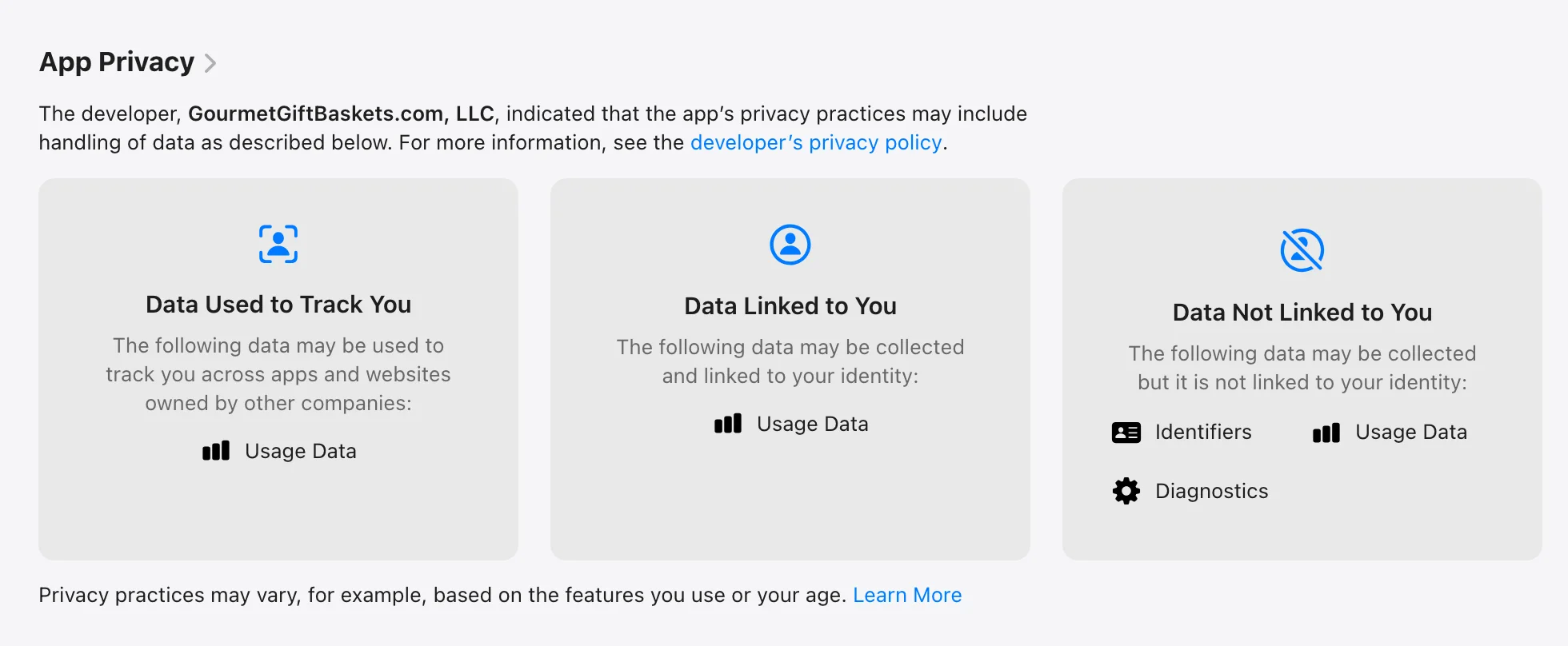
Apple’s rules ask you to declare everything you and your third-party partners collect, even data used only to make the app work. You can update your answers at any time without releasing an app update.
Google Play’s Data Safety Form
Google Play’s Data safety form is the Android counterpart to Apple’s privacy labels. Every app published on Google Play has to complete it, including apps that collect no data at all.
The form asks what data your app collects and shares, whether it’s encrypted in transit and whether people can ask for their data to be deleted. Your answers appear in the Data safety section of your Play Store listing.
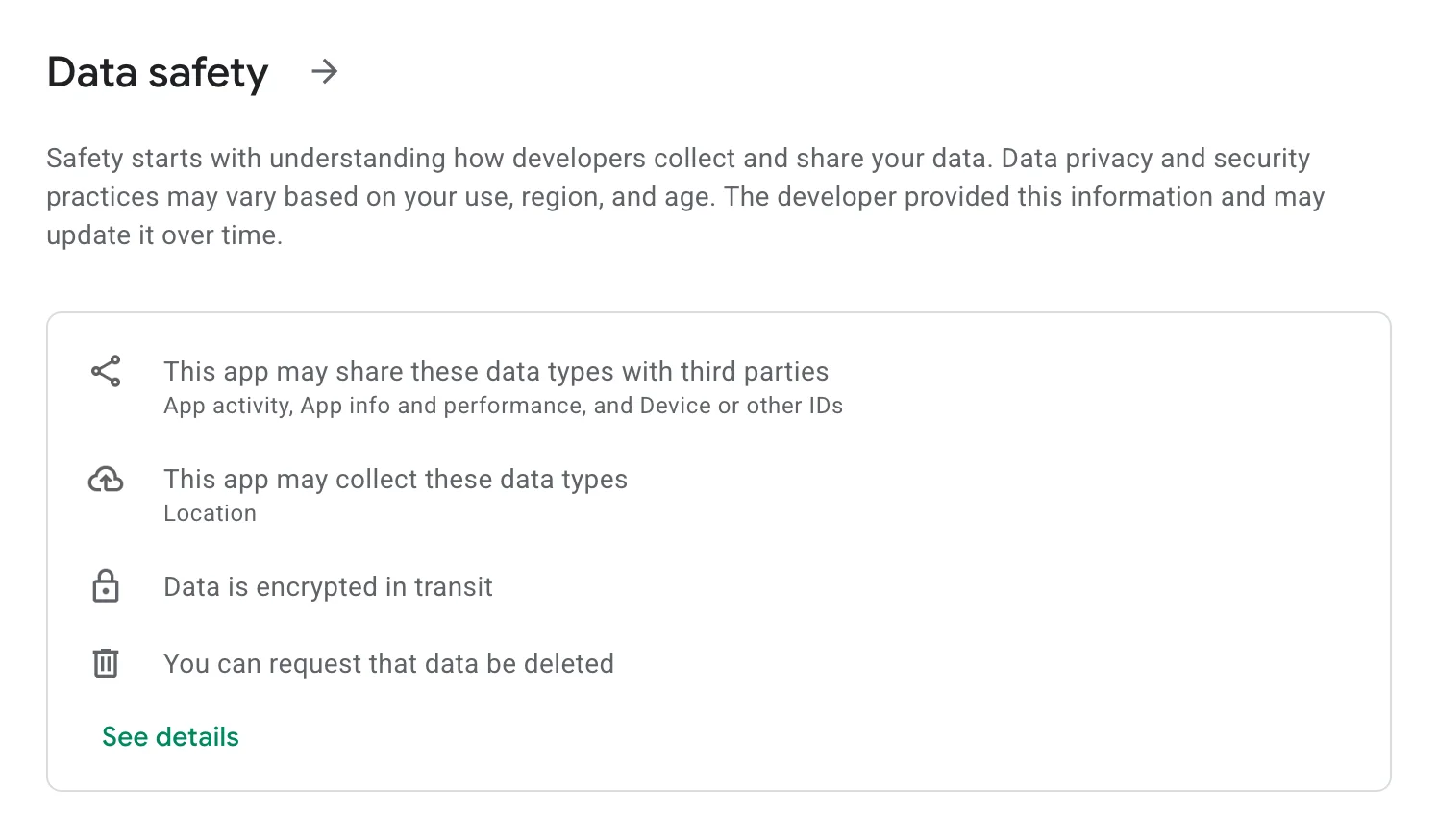
You alone are responsible for making the declaration complete and accurate. Google can block updates or remove apps whose answers stay wrong.
Do You Need In-App Account Deletion and Sign in with Apple?
In-app account deletion is required on both stores for any app that lets people create an account. Sign in with Apple is only required in some cases.
Apple requires apps that support account creation to let people start deleting their account inside the app, usually from the account settings. Deactivating the account isn’t enough, and outside highly regulated industries, you can’t make people call or email you to do it.
If deletion has to finish on your website, the app can link straight to the page where people complete it. Google Play asks for the same in-app path, plus a web page where people can request deletion of their account and data. You declare both in the Data safety form.
Apple’s login rule, Guideline 4.8, applies when an app uses a third-party or social login, like Google or Facebook, for people’s main account. The app then has to offer another login option as well.
That option must limit data to name and email, let people keep their email address private and not track them for ads without consent.
Sign in with Apple meets those terms, but the guideline doesn’t require it by name. Apps that only use the company’s own account system, like a store’s customer accounts, don’t need another login option at all.
How Do Age Ratings Work on Each Store?
Apple and Google both rate every app by age, based on a questionnaire about its content. Each store runs its own, and neither lets an unrated app stay on the store.
Apple’s age ratings have changed. On devices running iOS 26 or later, apps are rated 4+, 9+, 13+, 16+ or 18+, and developers had until January 31, 2026 to answer the new questions before their app updates were held up.
The new questions cover in-app controls and capabilities such as unrestricted web access, user-generated content and advertising. They also ask about topics like medical or wellness information. An app with unrestricted web access, for example, is rated 16+.
Google Play uses the International Age Rating Coalition (IARC) questionnaire, which gives your app the local rating in each region. Fill it in again whenever a content change affects your answers.
Both stores also set rules for the content itself. Apps can’t include harmful content, deceive users, impersonate another brand or infringe anyone’s intellectual property. Malware and hidden data collection are off-limits too.
Apps with user-generated content, like reviews or community posts, also need ways to filter, report and block abuse.
Will an App Built From Your Website Be Approved?
An app built from your website can be approved on both stores, as long as it does more than show the website in a frame.
Apple’s Guideline 4.2 on minimum functionality says an app needs features, content and UI that lift it above a repackaged website. If it isn’t useful, unique or “app-like,” Apple says it doesn’t belong on the App Store.
Compared with Apple, Google Play is a bit more lenient. Its policies target apps that wrap someone else’s website without permission or offer little content or function, but it still expects an app that’s stable and useful.
Both stores want an app-like experience, not a repackaged website, and Apple especially so. This matters most if you’re turning an ecommerce store into an app. Add the touches that make it feel like an app, such as mobile navigation, a native tab menu and push notifications.
Our guide to App Store review for webview apps goes deeper on Guideline 4.2 and what reviewers look for.
Do Ecommerce Apps Have to Use In-App Purchase?
Ecommerce apps don’t use Apple’s In-App Purchase or Google Play Billing for physical products. Both stores require payments for physical goods and services to go through your own checkout, such as Apple Pay or card payments.
The rules are different for digital goods. Subscriptions, premium content and in-app currency generally have to go through each store’s billing system. The exceptions vary by country, so check the current rules if your app sells anything digital.
Common Pitfalls: Things to Avoid
Many app store rejections come from the same handful of avoidable mistakes. Apple’s 2025 App Store Transparency Report shows which parts of its guidelines it cites most often.
| Guideline section | What it covers | Rejections in 2025 |
|---|---|---|
| Performance | Complete apps, accurate metadata, hardware and software requirements | 1,354,418 |
| Legal | Privacy, intellectual property and other legal rules | 495,673 |
| Design | Copycats, minimum functionality, spam and login services | 415,532 |
| Business | Payments and In-App Purchase | 283,820 |
| Safety | Objectionable content, user-generated content and apps for kids | 151,159 |
A single submission can be rejected under more than one section. Even so, Performance, which covers whether an app is complete, stable and accurately described, is cited far more often than anything else.
Watch for these common issues:
- Incomplete apps or information. Don’t submit beta builds, partial builds or anything else that makes the app look unfinished, and fill in all the information each store asks for.
- Broken links and placeholder text. Make sure every link works and no placeholder text (like lorem ipsum) is left anywhere. The app should work exactly as you intend for real users.
- A direct copy of your website. For website-based apps, this is probably the most common reason for rejection, so give the app features of its own.
- Poor UI and UX. If the app looks bad or is awkward to use, it’ll likely be rejected. That’s a real risk if your website isn’t responsive and optimized for mobile screens.
- No way for reviewers to test the app. Give reviewers a working demo account and keep your backend running during review. Explain any features that aren’t obvious and how to test them. Google asks for the same in Play Console’s App access section.
- Privacy answers that don’t match the app. Check what every SDK in the app collects before you fill in App Privacy and Data safety.
- Mentioning other platforms. Don’t mention Android or Google Play in your App Store listing. Apple’s Guideline 2.3.10 rules out other mobile platforms’ names, icons and imagery in your app and metadata.
For Apple’s side in more detail, read our breakdown of 16 reasons Apple could reject your app. This short video from our team also runs through the main tips for getting past both stores’ review.
Pre-Submission Checklist
Before you submit to either store, run through this checklist. Rushing to start the process is likely to cost you more time and money in the long run.
- Test the release build on real devices and on the oldest OS versions you support, using TestFlight on iOS and Google Play’s testing tracks on Android.
- Check the build meets the 2026 minimums: Xcode 26 for iOS and Android 16 (API level 36) for Android.
- Make sure everything in the app is complete, live and ready for real users, with no placeholder content, test data or broken links.
- Create a demo account that unlocks every feature, and write notes explaining anything that isn’t obvious.
- Publish your privacy policy, and link to it in the app and in both stores.
- Fill in App Privacy and Data safety based on what the app and its SDKs actually collect.
- Add in-app account deletion if people can create an account.
- Answer both age rating questionnaires honestly.
- Prepare your listings, including screenshots, descriptions and up-to-date contact and support details.
- Read both stores’ current guidelines one last time: Apple’s App Review Guidelines and Google’s Developer Program Policy.
How to Submit Your App
You submit an iOS app through App Store Connect and an Android app through Google Play Console. Whichever store you start with, submit the full, release-ready version of your app.
How to Submit to the App Store
- Enroll in the Apple Developer Program and create an app record in App Store Connect.
- Build the app with Xcode 26 or later and upload it to App Store Connect.
- Test the build with your team and beta testers in TestFlight.
- Fill in your product page: screenshots, description, keywords, support URL and privacy policy URL.
- Answer the App Privacy and age rating questions, then set pricing and availability.
- Add your App Review information, including a demo account and notes for the reviewer.
- Choose a release option: release the app yourself, automatically after approval or automatically on a date you set.
- Select the build, click Add for Review, then click Submit for Review.
How to Submit to Google Play
- Register a Google Play developer account and verify your identity.
- In Play Console, select Create app and enter the app’s name, default language and whether it’s free or paid.
- Set up your main store listing, with descriptions, screenshots, a category and contact details.
- Complete the App content declarations, including your privacy policy, access for reviewers, ads, content rating, target audience and Data safety.
- Upload an Android App Bundle to a testing track and test it. For new personal accounts, this is where the 14-day closed test happens.
- Create a production release, send it for review and roll it out. With managed publishing, you choose exactly when approved changes go live, which is ideal when the launch is tied to a campaign.
How Long Does App Review Take?
Apple’s App Review typically handles at least 50% of submissions in under 24 hours and 90% in under 48 hours, according to Apple. Incomplete submissions take longer, or don’t pass at all.
You can ask Apple to expedite a review for a critical bug fix or an event tied to your app. It’s a request, though, not a promise.
For some accounts, Google says reviews can take up to seven days, or longer in exceptional cases. Build that time into your launch plan, along with the 14-day closed test if you’re publishing from a new personal account.
If your app is rejected, each store tells you which rule it didn’t meet. You can fix the problem and resubmit. If you think the reviewer got it wrong, reply to them or appeal the decision (at Apple, to the App Review Board).
How MobiLoud Handles App Store Submission
MobiLoud handles app store submission for its customers, along with the compliance work that comes with it. We build website-powered apps: your web code combined with a native layer to create a custom mobile app, powered by your site.
You sign up for your own Apple and Google developer accounts as a company, and we do the rest. We take care of the technical requirements, like building with the latest Xcode and Android versions and keeping the app’s privacy manifest in order.
We help you get your App Privacy and Data safety answers right too, since they depend on what your website collects. We also prepare your screenshots and store descriptions, submit both apps and handle the back-and-forth with reviewers.
The native layer adds what makes an app feel like an app, such as native navigation, a tab bar and push notifications. We’ve found the sweet spot for website-powered apps: enough to meet the stores’ standards, while keeping what makes your website great.
After launch, we keep your app up to date as iOS and Android change, so new requirements like this year’s are our job, not yours.
No one can guarantee approval, because Apple and Google make that call. But we’ve published more than 2,000 apps since 2013, and we know what reviewers look for.
"What really attracted us to MobiLoud is that you guys handle the app submission process and updates."
Final Thoughts
Unless you’re building an app for private use, you’ll want it in the app stores. There’s minimal downside, with very little expense and no risk, and huge upside for your brand and as a user acquisition channel.
The only real cost is the time and effort it takes to get past review. Most of what the stores ask for lines up with good practice for any app launch. But the process can be frustrating for first-time publishers, and the rules change every year.
So check both stores’ current requirements before every release, not just the first one. Once you’re live, our App Store optimization guide will help people find your listing, and our app launch playbook covers how to win your first users.