Many of the world’s most successful apps are free to download. Games, dating apps, streaming services and language courses make their money after the install, through in-app purchases.
But in-app purchases come with rules. Apple and Google decide which sales have to go through their billing systems, take a share of each one, and have changed those rules a lot since 2025, from US court rulings to new fees in Europe and Japan.
This guide covers what in-app purchases are, which sales have to use them, how they work, how much you’ll pay, and everything else you need to know if you’re launching a mobile app.
What Does In-App Purchase Mean?
An in-app purchase is a payment for digital content or features inside an app, processed through Apple’s In-App Purchase system on iOS or Google Play Billing on Android. It’s how apps sell subscriptions, premium features, game currency and other extras after someone has downloaded them.
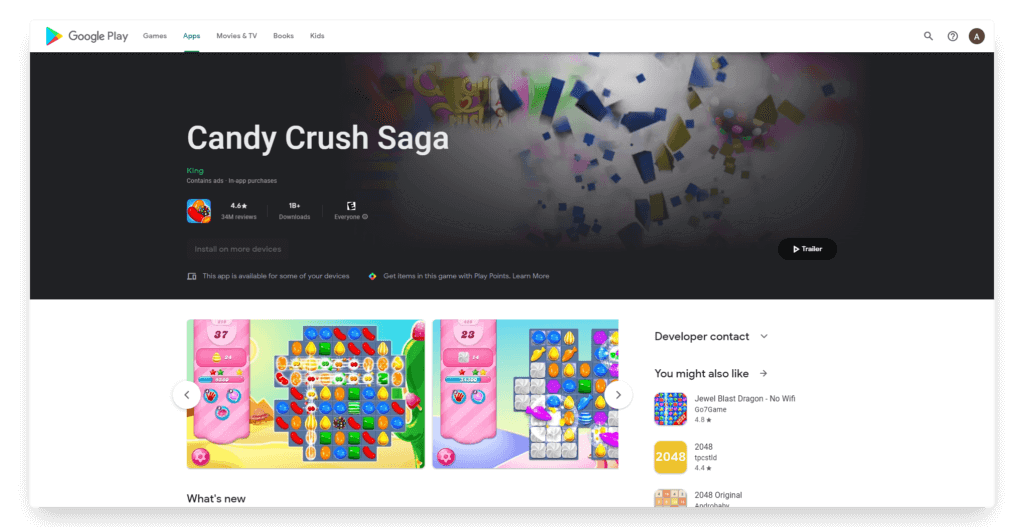
Apps that sell them carry an “In-App Purchases” label on their App Store and Google Play listings, next to the price or under the developer’s name. Many of them are free to download and earn all their revenue this way.
Which Sales Have to Use In-App Purchase?
Apple requires in-app purchase whenever an app unlocks features or functionality. Its App Review Guidelines name subscriptions, in-game currencies, game levels, access to premium content and unlocking a full version as examples.
Physical goods and real-world services are the opposite. Apple’s Guideline 3.1.3(e) says apps that sell goods or services used outside the app must use another payment method, such as Apple Pay or a credit card.
Google’s Payments policy draws the same line. Google Play’s billing must not be used for physical goods like groceries, clothing, housewares and electronics, or for services like transportation, food delivery and event tickets.
| What the app sells | Example | In-app purchase? |
|---|---|---|
| Game currency | Candy Crush Saga's Gold Bars | Yes |
| An app subscription | Super Duolingo | Yes |
| Premium features or a full version | Removing ads, unlocking pro tools | Yes |
| Physical products | Clothing, beauty, groceries, furniture | No |
| Repeat deliveries of physical products | A monthly coffee or supplements order | No |
| Real-world services | Rides, food delivery, event tickets | No |
The rules on digital goods have loosened in some markets, where apps can now point customers to other ways to pay. Those exceptions are covered below.
The Four Types of In-App Purchase
Apple’s developer documentation splits in-app purchases into four types. Google Play uses different names, one-time products and subscriptions, but the same models apply.
Consumable
A consumable is used up and then bought again. Game currency, extra lives, hints and one-off boosts are all consumables, like Candy Crush Saga’s Gold Bars or Duolingo’s gems.
Consumables can’t be restored, so customers can lose any they haven’t used if they delete the app or move to a new phone.
Non-Consumable
A non-consumable is bought once and never runs out. Removing ads, unlocking a full game, upgrading to a pro edition and buying bonus levels are typical examples.
Apple requires apps to give customers a way to restore non-consumables, so they can get them back on a new device or after reinstalling the app.
Auto-Renewable Subscription
An auto-renewable subscription gives access for a set period, such as a week, a month or a year, and renews until the customer cancels it. Streaming, news, fitness, dating and learning apps mostly sell these.
Apple requires each subscription period to last at least seven days and to work on all of the subscriber’s devices.
Non-Renewing Subscription
A non-renewing subscription gives access for a limited time and then ends. Apple’s own example is a one-year subscription to an archive of articles.
These are much rarer than auto-renewing ones. When one runs out, the customer has to buy it again.
How Popular Apps Use In-App Purchases
A lot of successful apps mix more than one type of in-app purchase. Here are some of the biggest examples, and how their commercial model falls under the category of in-app purchases.
| App | Download price | What it sells in the app | IAP Type |
|---|---|---|---|
| Candy Crush Saga | Free | Gold Bars, extra moves, extra lives and boosters like the Lollipop Hammer | Consumable |
| Duolingo | Free | Super Duolingo and packs of gems | Subscription and consumable |
| Tinder | Free | Tinder Plus and Tinder Gold, plus Boosts and Super Likes | Subscription and consumable |
| YouTube | Free | YouTube Premium, Premium Lite and Super Chat | Subscription and consumable |
| Medium | Free | Medium Membership and Friend Membership | Subscription |
| Crossy Road | Free | Extra characters to play as | Non-consumable |
| Plague Inc. | $0.99 | Expansion packs and unlocks | Non-consumable |
Subscriptions bring in recurring revenue, while consumables like game currency can be bought again and again, which is why many apps sell both.
How In-App Purchases Work
An in-app purchase runs through the store’s own billing system: Apple In-App Purchase on iOS and Google Play Billing on Android.
- The app shows a product, upgrade or subscription.
- The customer taps to buy, and Apple or Google shows its own payment sheet.
- The customer confirms, paying with the card or balance on their account.
- The store tells the app the payment went through, and the app unlocks the item.
The store handles the payment, receipts, currencies and subscription billing. That makes buying easy for customers, who never type in a card number, and in return the store takes a commission on the sale.
Refunds mostly go through the store too. Apple handles refund requests for purchases made through its billing, while Google refunds some purchases itself and sends customers to the developer for others.
Developers still handle the rest. They deliver what was bought, keep subscriptions in sync across devices and, under Apple’s rules, offer a way to restore purchases.
How Much Do Apple and Google Charge for In-App Purchases?
Apple’s standard commission on in-app purchases in the US is 30%, while Google Play’s now starts at 10%. Both charge less to smaller developers and on subscriptions.
| Apple App Store | Google Play | |
|---|---|---|
| Standard rate | 30% | Above $1 million a year, 20% for new installs or 25% for existing installs, plus a 5% billing fee |
| A developer's first $1 million a year | 15% in the App Store Small Business Program | 10%, plus a 5% billing fee |
| Subscriptions | 30% in a subscriber's first year, 15% after that | 10%, plus a 5% billing fee |
Apple’s 15% rate comes through the App Store Small Business Program, which is open to developers who made up to $1 million in proceeds the year before. Subscriptions also drop to 15% once a subscriber has a full year of paid service, according to Apple.
Google changed its fees on June 30, 2026, in the US, UK and European Economic Area, and on September 30, 2026, in Australia and Japan. Its service fee is now 10% on a developer’s first $1 million a year and on all auto-renewing subscriptions.
Above $1 million, other purchases cost 20% from people who installed the app after the change and 25% from people who installed it earlier. Google adds its 5% billing fee only when the purchase goes through Google Play Billing, so developers who use their own billing or link to their website don’t pay it.
Google plans to bring the new fees to every market by September 30, 2027. Until then, its older rates apply elsewhere: 15% on the first $1 million a year, 30% after that and 15% on subscriptions.
Apple’s commission also depends on where your customers are. Here’s what it charges on Apple In-App Purchase in four markets with different rates.
| Market | Standard commission | Small developers and subscriptions after a year |
|---|---|---|
| United States | 30% | 15% |
| European Union (since October 1, 2026) | 26% | 15% |
| Japan (since December 2025) | 21%, plus a 5% payment processing fee | 10%, plus the 5% fee |
| Mainland China (since March 15, 2026) | 25% | 12% |
Can You Take Payments Outside the App Stores?
Apps in the US, the EU and Japan can now point customers to other ways to pay for digital goods, often with lower fees. Court rulings and new laws in those markets forced the change, and the details differ in each one.
Those sales sit outside Apple’s and Google’s refund and subscription tools, so you handle them yourself. Apple tells customers to contact the developer about purchases made outside its billing.
Australia may be next. In October 2026, a court there ordered Apple to allow other app stores and payment options from 2027, and Apple says it will appeal.
United States
On April 30, 2025, a federal judge ruled that Apple had broken an earlier court order in Epic Games’ case against it. The next day, Apple updated its guidelines so apps on the US App Store can include buttons and links to buy elsewhere.
Apple can’t charge a commission on those outside purchases for now. An appeals court ruled in December 2025 that Apple may charge some fee, and a federal court is still working out how much, after Apple proposed up to 15% in August 2026.
The Supreme Court also agreed in June 2026 to hear Apple’s appeal of the April 2025 ruling, so the US rules for Apple are still in flux.
Google has let developers serving US users link to outside purchases and use their own billing since October 29, 2025, after losing its own antitrust case to Epic. Google and Epic settled in March 2026, and Google is starting to collect its service fees on those outside sales in late 2026.
European Union
Apple’s current EU terms took effect on October 1, 2026, under the Digital Markets Act. They followed a €500 million fine from the European Commission in April 2025 for stopping developers from steering users to offers outside the App Store.
Apps in the EU can now offer their own payment option alongside Apple’s, or link to a website. Developers have to keep whichever payment options they choose for 12 months.
- Sales through Apple In-App Purchase cost 26%, or 15% for small developers and subscriptions after their first year.
- Another payment option inside the app costs 20%, or 10%.
- A link to buy outside the app costs 15%, or 10%, on sales made within seven days of the tap.
Google Play also lets developers in the European Economic Area offer their own billing or link to outside offers, under its own program rules and the fees above.
Japan
Apple opened up payments in Japan on December 17, 2025, to comply with Japan’s Mobile Software Competition Act. Apps can offer another payment method next to Apple’s or link to a website, and alternative app marketplaces are allowed.
Apple’s commission there is 21%, plus a 5% payment processing fee when people pay with Apple In-App Purchase. Program members and subscriptions after their first year pay 10% plus the processing fee, and links to a website cost 15%, or 10%.
Do Ecommerce Apps Pay In-App Purchase Fees?
Ecommerce apps don’t pay Apple or Google in-app purchase fees on physical products. As the rules above show, physical goods have to go through the app’s own checkout, not the stores’ billing.
So a store’s app runs its own checkout, with the payment methods its customers already use. The brand pays its normal payment processing fees, and Apple and Google take nothing from the order.
That holds for subscribe-and-save orders too, because what arrives is a physical product.
It’s a big difference from apps that sell digital content. A subscription app in the US gives up to 30% of each sale to the store, while a shopping app keeps its full margin on every order placed in it.
A Native App for Your Store
For an ecommerce brand, that makes an app one of the most profitable places to take an order. There’s no store commission, and the customers who use it are usually your best ones.
In our benchmark report, we found app users converted at 1.7 to 3 times the rate of mobile web visitors. Their lifetime value was 2.8 to 5 times that of web-only shoppers.
A native app also gives your regulars a reason to keep coming back: your icon on their home screen, and push notifications that reach them directly on iPhone and Android.
MobiLoud transforms your website into a custom native app, powered by the same underlying code as your website. We build the app from your site’s code, so your products, checkout and payment methods are there from day one.
Then we design a fully custom, native interface for the app, and add what only an app can do:
- Push notifications that reach your customers on iPhone and Android
- A listing in the App Store and Google Play
- App-only pages your team builds in your own platform
- Native features, SDKs and device integrations where you need them
Because it feeds from the same codebase, your app always stays consistent with your site. Our team builds, launches and looks after it, so there’s nothing for your team to maintain.
"Push notifications have replaced expensive remarketing campaigns. Having our brand icon on customers' phones is a game-changer for retention."
Final Thoughts
In-app purchases are how many of the most successful apps make their money: digital extras, from game currency to subscriptions, sold through Apple’s and Google’s billing systems.
For developers, the store’s cut depends on what you sell, how much you earn and where your customers are. The rules for digital goods are still shifting in the US, Europe and Japan, so the right setup today may change within a year.
For ecommerce brands, the answer is much simpler. Physical products go through your own checkout, so an app gives your best customers a better way to shop without handing a share of each order to Apple or Google.