Paste a working React component into a React Native app and it won’t render. The hooks, props and logic are all fine, but the markup isn’t: React Native has no <div>, no <p> and no CSS, and its docs warn that a line of text placed directly inside a <View> will raise an exception.
That trips up a lot of teams, because the two share a name, an origin at Facebook and most of their syntax. A plan to port a web app to React Native in a few weeks tends to turn into a rebuild of every screen.
The difference between React and React Native comes down to where your code runs: in a browser, or as a native app on a phone. This guide covers what each one is, how they differ, how much code they can share and which to use for your next project.
React vs React Native: Mobile vs Web Framework
React is a JavaScript library for building user interfaces for websites and web apps, while React Native is a framework for building mobile apps for iPhone and Android with React. Both use JavaScript, JSX and reusable components.
They render to different places. React builds HTML that a browser displays, styled with CSS. React Native builds native iOS and Android views, so the result is a real app that people install from the App Store or Google Play.
That one difference shapes everything else, from the components you write to how you ship updates, so it’s worth getting clear on before you start building an app or hiring developers.
What Is React?
React (also called React JS or React.js) is an open-source JavaScript library for building user interfaces, mostly for websites and web apps. Facebook created it, first using it for its News Feed, and released it as open source in 2013.
React’s main idea is to break an interface into components: small, reusable pieces that each manage their own markup, logic and state. You describe what each one should look like for a given state, and React updates the page when that state changes.
React handles only the interface. Your code still runs as HTML, CSS and JavaScript in the browser, and for routing, data loading and server rendering the React team recommends a framework such as Next.js or React Router.
React is the second most used web framework among developers: in Stack Overflow’s 2026 Developer Survey, 41.5% of respondents had worked with it in the past year, behind only Node.js at 46.4%.
Since February 2026, React has been owned by the React Foundation, hosted by the Linux Foundation, rather than by Meta. The latest version, React 19.3, came out in September 2026.
Well-known products that have used React include Netflix, Airbnb, Codecademy and, of course, Meta’s own apps.
Pros and Cons of React for Web Development
React is widely considered one of the best, most developer-friendly ways to build a web interface:
- Components make it fast to build and iterate, because you build each piece once and reuse it.
- It’s JavaScript (or TypeScript), so most web developers can pick it up quickly.
- It works across every modern browser and screen size, from phones to desktops.
- It has a huge ecosystem of frameworks, component libraries, tutorials and developers to hire.
It has no major drawbacks for web development, just a few rough edges:
- JSX and React’s way of thinking take some getting used to if you’re not already comfortable with JavaScript.
- React code can become bloated, which hurts performance if nobody keeps an eye on it.
- It only handles the interface, so you need a framework or other tools for routing, data and the backend.
What Is React Native?
React Native is an open-source framework for building iOS and Android apps with React, from one JavaScript or TypeScript codebase.
Facebook open-sourced React Native in March 2015, and like React, it has belonged to the React Foundation since February 2026. The latest version, React Native 0.87, came out in August 2026.
React Native’s components map to real platform views. A <View> becomes a UIView on iOS and a ViewGroup on Android, and a <Text> becomes a UITextView or a TextView, so the app looks and behaves like any other app on that phone.
Since version 0.82, released in October 2025, every React Native app runs on the New Architecture, which replaced the old asynchronous bridge between JavaScript and native code. Version 0.84 made the Hermes V1 JavaScript engine the default in February 2026.
The React Native team recommends starting new apps with Expo, a framework that adds file-based routing, native modules and build tooling. Expo SDK 57, from June 2026, runs on React Native 0.86.
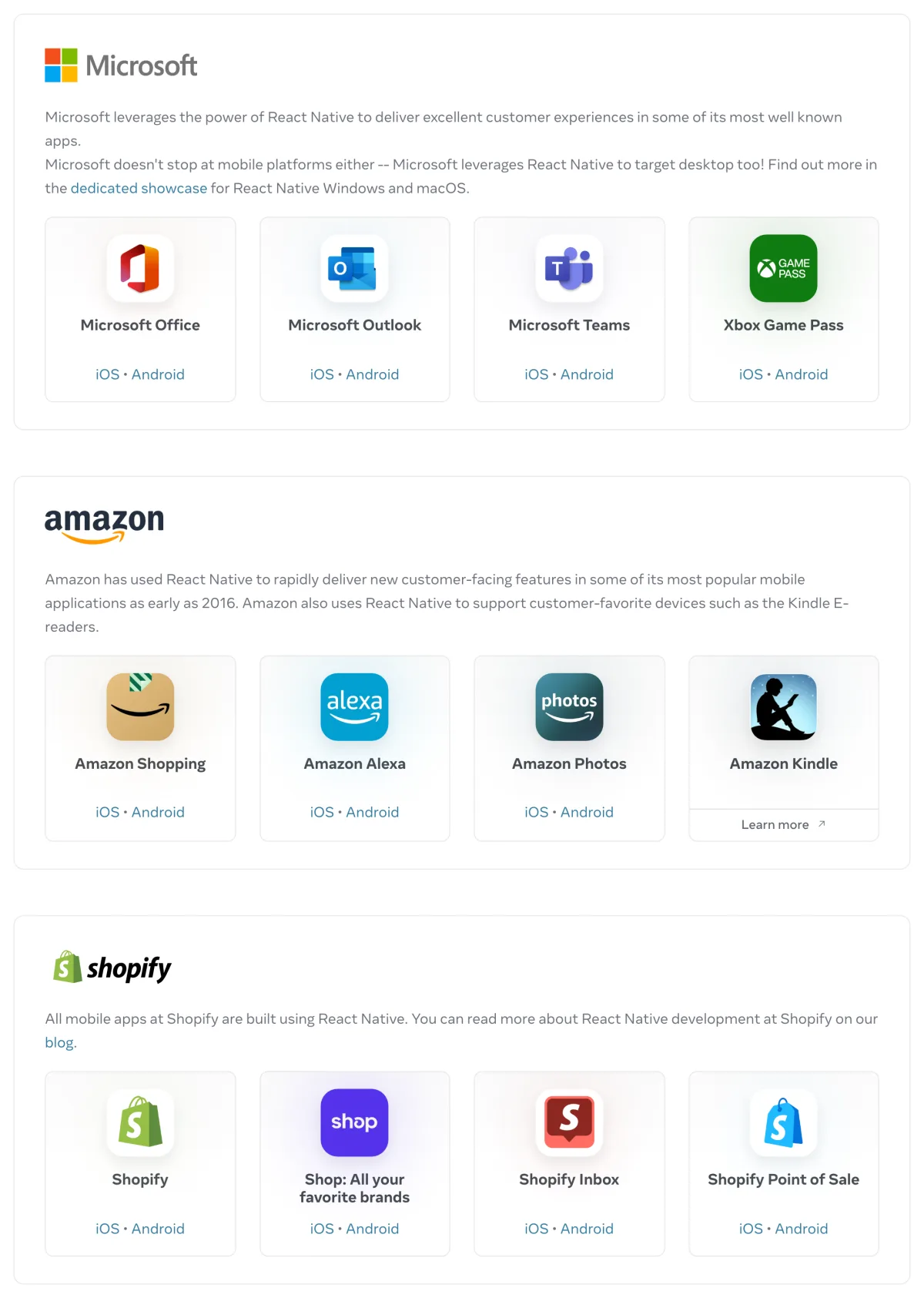
React Native’s showcase lists the Facebook app, Microsoft Office, Outlook and Teams, Amazon Shopping and Alexa, every Shopify mobile app, Discord, Coinbase and Bloomberg.
Is React Native an Alternative to React JS?
React Native isn’t an alternative to React JS, because the two do different jobs: React builds for the web and React Native for mobile. You only choose between them when you decide where your product should live.
React Native is better thought of as an extension of React. It brings React and JavaScript to mobile development, so you can build a real native app without writing Swift for iOS and Kotlin for Android.
Pros and Cons of React Native for Mobile Development
React Native’s biggest benefit is code reuse. One codebase ships to both iOS and Android, so the app takes less work to build, update and maintain.
Fully native development means two apps, one in Swift and one in Kotlin, usually built by two teams. Our React Native vs native development comparison goes deeper on that choice.
Two other strengths stand out:
- It’s approachable for web developers: if you know JavaScript and React, most of what you know carries over.
- It shows real native components rather than web pages, so it feels more native compared with hybrid frameworks such as Ionic, which run web code inside an app.
There aren’t many major downsides, but these are the ones you’re most likely to hit:
- React Native apps can’t always match fully native apps on performance, and brand-new iOS and Android features may wait for the framework or need native code.
- It’s cheaper than two native apps, but it’s still a full app build, and that isn’t cheap.
- Complex, highly custom interfaces and heavy animation can take extra work.
- Debugging is harder when nobody on the team knows native code.
- You still need a separate codebase for your website, unless you build that with React Native too.
How Are React and React Native Related?
React and React Native share the same core: the react package itself. Components, props, state, context, hooks and JSX work the same way in both, because they’re the same code.
What differs is the renderer underneath. React DOM turns your components into HTML elements in the browser, and React Native turns them into iOS and Android views.
New React features usually reach both. React 19’s Actions, useOptimistic and use arrived in React Native 0.78 in February 2025, and the React Compiler, stable since October 2025, works on both and is on by default in new Expo apps.
Some features reach the web first. React 19.3’s <ViewTransition> only works in the DOM so far, and a new React Native 0.87 project still starts on React 19.2.
Here’s the same product card written for each, first for the web with React:
import { useState } from 'react';
import './ProductCard.css';

export function ProductCard({ product }) {
  const [saved, setSaved] = useState(false);

  return (
    <div className="card">
      <img src={product.image} alt={product.name} />
      <h3>{product.name}</h3>
      <button onClick={() => setSaved(!saved)}>
        {saved ? 'Saved' : 'Save'}
      </button>
    </div>
  );
}
And for iOS and Android with React Native:
import { useState } from 'react';
import { View, Text, Image, Pressable, StyleSheet } from 'react-native';

export function ProductCard({ product }) {
  const [saved, setSaved] = useState(false);

  return (
    <View style={styles.card}>
      <Image source={{ uri: product.image }} style={styles.image} />
      <Text style={styles.name}>{product.name}</Text>
      <Pressable onPress={() => setSaved(!saved)}>
        <Text>{saved ? 'Saved' : 'Save'}</Text>
      </Pressable>
    </View>
  );
}

const styles = StyleSheet.create({
  card: { padding: 16, borderRadius: 12, backgroundColor: '#fff' },
  image: { width: '100%', aspectRatio: 1 },
  name: { fontSize: 16, fontWeight: '600' },
});
The state, the props and the logic are identical. Everything the component renders is different: <div> becomes <View>, text sits inside <Text>, onClick becomes onPress and the CSS file becomes a JavaScript style object.
Biggest Differences Between React and React Native
React and React Native differ in what they render, how you style and navigate, which device features you can reach and how updates get to users.
| React | React Native | |
|---|---|---|
| What it's for | Websites and web apps | iOS and Android apps, plus Meta Quest, Windows and macOS apps |
| Renders as | HTML elements in the browser, through React DOM | Native iOS and Android views |
| Building blocks | <div>, <p>, <img>, <input> and every other HTML element | <View>, <Text>, <Image>, <TextInput>, <ScrollView> and other core components |
| Styling | CSS in any form: stylesheets, CSS modules, Tailwind or CSS-in-JS | JavaScript style objects with camelCase names; flexbox layout that stacks in a column by default |
| Navigation | URLs and the browser's back button, with React Router or Next.js | Screen stacks and tabs, with React Navigation or Expo Router |
| Device features | What the browser allows, such as storage, location and web push | Native modules for the camera, native push notifications, biometrics and secure storage |
| Recommended setup | Next.js or React Router, or Vite to build your own | Expo |
| Shipping updates | Deploy to your server, and users get it on their next visit | New builds through App Store and Google Play review; JavaScript-only changes can ship over the air |
| Debugging | Browser DevTools and React DevTools | React Native DevTools |
| First released | 2013 | 2015 |
| Latest version (October 2026) | React 19.3, September 2026 | React Native 0.87, August 2026 |
React Renders HTML, React Native Renders Native Views
React builds a tree of HTML elements, and the browser lays them out and draws them. Anything that works in a browser works in a React app, including semantic HTML that search engines and screen readers understand.
React Native has no HTML at all. You build with a small set of core components, such as View, Text, Image, ScrollView and TextInput, and React Native creates the matching iOS or Android view for each one while the app runs.
React Native Styles With JavaScript, Not CSS
React works with CSS in any form, from plain stylesheets to CSS modules, Tailwind and CSS-in-JS. Everything you know about the cascade, selectors and media queries applies.
React Native styles components with JavaScript objects passed to a style prop, usually created with StyleSheet.create. Property names are camelCase (backgroundColor, not background-color), there are no selectors and text only inherits styles inside a <Text> tree.
Layout is flexbox, but with different defaults: items stack in a column rather than a row, and they don’t shrink unless you tell them to.
Navigation and Device Features Use Different Libraries
Navigation on the web follows URLs and the browser’s back button, usually handled by React Router or Next.js. A mobile app moves between screens in stacks and tabs, with React Navigation or Expo Router, a file-based router that makes every screen deep linkable.
Device features split the same way. A React app can use what the browser allows, such as storage, location and web push. A React Native app reaches the phone itself through native modules, for the camera, native push notifications, Face ID and secure storage.
React Ships to a Server, React Native Through the App Stores
A React app updates when you deploy it: every visitor gets the new version on their next visit. A React Native app is installed on the phone, so a new version goes through App Store and Google Play review and reaches people as an app update.
Expo’s EAS Update narrows that gap by sending JavaScript, styling and image changes over the air. Changes to native code or permissions still need a new build in the stores.
Cost of Hiring React Developers vs React Native Developers
Hiring React and React Native developers costs about the same per hour, which reflects how much the two skill sets overlap.
Development agency Bacancy puts senior React developers in North America at $121 to $140 an hour, in a guide last updated in February 2025, and React Native developers in the US at $100 to $150 an hour, in January 2026.
ZipRecruiter put the average US salary for a React Native developer at $129,348 a year in October 2026, about $62 an hour.
The bigger difference is the project, not the rate. In most cases, mobile app development is more complex and takes longer (and so costs more) than building a web app.
Can You Share Code Between React and React Native?
React and React Native can share a lot of code, but mostly below the interface: logic, data and state, not the screens themselves.
| Part of the app | Shares between web and native? |
|---|---|
| Business logic, validation and formatting | Yes, as plain JavaScript or TypeScript |
| API clients and data fetching | Yes |
| State management and custom hooks | Yes, as long as they don't touch the DOM or browser APIs |
| TypeScript types | Yes |
| Screens and UI components | No, unless they're written with React Native components and rendered on the web with React Native for Web |
| Styles | No: CSS doesn't run in React Native |
| Routing | No, unless both apps use Expo Router |
| Browser APIs | No: document and localStorage don't exist in React Native |
A few tools make that sharing easier:
- React Native for Web. It renders React Native components as HTML in the browser and powers Expo’s web support. It only works in one direction: it doesn’t turn HTML-based React components into native ones.
- Expo and Expo Router. One Expo project can target iOS, Android and the web, with the same file-based routes on all three.
- Monorepos. A web app and a mobile app can live in one repository, with shared packages for logic, types and API clients. Expo supports monorepos built with npm, Yarn, pnpm or Bun workspaces.
- Platform-specific files. When a module needs different code on mobile, React Native’s bundler picks a
.native.jsfile over the plain.jsversion, which your web bundler uses.
Meta’s React Strict DOM, which runs the same styled components on web and native, is one to watch, but it hasn’t reached a 1.0 release.
Sharing screens has limits. It’s a strong fit when the web version can look and work like the app, but a website built for search traffic and an app built around gestures pull a component in different directions. Most teams share logic everywhere and screens only where the two experiences really match.
Is It Easy to Translate a React Web App to a React Mobile App?
Turning a React web app into a React Native app isn’t easy, despite the shared syntax. There’s no converter: every component that renders HTML has to be rewritten with React Native components, every stylesheet rebuilt as style objects and the routing replaced with mobile navigation.
Your logic, API calls and hooks can come with you if they don’t touch the DOM. Everything the user sees gets rebuilt, which for any decent-sized app is most of the work, and it’s often easier to start fresh than to edit web components line by line.
Once it’s done, you have two codebases to maintain, which means twice the effort every time a feature changes, assuming your web and mobile apps are meant to work the same.
When to Use React Native vs React
Choosing between React and React Native is simple once you know where your users will use the product. If it’s meant for phones and doesn’t need a web version, go with React Native. If it needs to work in the browser on desktop and mobile, React is the better choice.
| Your project | Best suited to | Why |
|---|---|---|
| A website, online store, dashboard or SaaS app used in the browser | React, with Next.js or React Router | It works on any device with a browser, updates on every deploy and can be indexed by search engines. |
| An app that lives on phones and needs the App Store and Google Play | React Native, started with Expo | You get native views, device features and both app stores from one codebase. |
| A new product that needs web, iOS and Android from day one | React Native with Expo, using React Native for Web in the browser | One set of screens and routes covers all three, as long as the web version can look like the app. |
| A product that needs a great website and great mobile apps | React for the web and React Native for mobile, sharing logic in a monorepo | Each platform gets its own interface, and the business logic is written once. |
| Apps built around the hardware, such as 3D games and AR | Native Swift and Kotlin | They need direct, fast access to graphics and sensors. |
A mobile-friendly React app, or a progressive web app built with React, can also cover phones for a while. Your product stays available to mobile users, through the browser.
You’ll give up some of the mobile experience, though. On iPhone, for example, a PWA can only send push notifications to people who add it to their Home Screen.
Should You Learn React or React Native First?
Learning React first is the better path for most developers, because React Native is built on it. React Native’s own docs say it helps to understand React first, and React’s components, props, state and hooks are exactly what you use on mobile.
React Native then adds the mobile layer: native components, styling without CSS, screen-based navigation and the iOS and Android toolchains. For a React developer, that’s a short step, which makes React Native ideal for a web team moving into mobile.
Alternatives to React
Other front-end JavaScript frameworks include:
These frameworks do the same job as React, and some developers prefer their syntax, capabilities or performance. In Stack Overflow’s 2026 survey, Vue.js (17.2%) and Angular (16.0%) were the most used of them.
Alternatives to React Native
React Native alternatives include cross-platform frameworks such as:
- Flutter, Google’s Dart framework, which draws its own interface
- Ionic, which runs web code inside a native app with Capacitor
- .NET MAUI, Microsoft’s C# framework, which replaced Xamarin when Xamarin’s support ended in May 2024
- NativeScript, which gives JavaScript direct access to native APIs
Flutter and React Native were the two most used cross-platform frameworks every year from 2019 to 2023, with Flutter used by 46% of respondents in 2023 and React Native by 35%. Our React Native vs Flutter comparison and cross-platform app development guide go deeper.
Expo sometimes shows up on these lists, but it’s more an extension of React Native than an alternative: it’s the framework the React Native team recommends building with.
Should You Convert Your React App to Mobile Apps with React Native?
Rebuilding a React web app in React Native isn’t the ideal way to get mobile apps, though it’s quicker and easier than coding separate native iOS and Android apps.
It means every screen rebuilt with native components, a second codebase to keep in step with the web app, mobile developers to hire or train and months of work before launch.
A React Native build is best suited to a mobile app that needs to be its own product, with an experience, offline behavior or device features your web app doesn’t have.
When the app should do what your web app already does, it’s much better to reuse the code you’ve already written.
MobiLoud builds native iOS and Android apps on top of your React web app, with native navigation, push notifications and links that open the app, and publishes them to the App Store and Google Play.
There’s no rebuild and no second codebase: your team keeps shipping through its normal deploys, and every change shows up in the app. To your users, it’s a native app like any other.
Apps typically go live in 2 to 4 weeks. Pricing starts at $1,499 a month with a one-time setup fee, less than half the cost of one full-time React Native developer. See the brands that use MobiLoud on our case studies page.
The Bottom Line on React vs React Native
React and React Native are two sides of the same library. React builds interfaces for the browser, and React Native uses the same components, hooks and JSX to build real iOS and Android apps.
Use React for websites and web apps, and React Native, started with Expo, for apps that live in the app stores. Learn React first if you’re new to both, and expect to share logic, data and types between the two, not screens.
If you already have a React web app and need it in the app stores, don’t assume the answer is rebuilding it in React Native.