Table of contents
There’s a lot of talk in app development circles about native apps and WebView apps, and their relative merits.
A lot of it, to be honest, is out of date. Native is held up as the “gold standard” for apps, while the word WebView is basically used as a slur.
The reality is: both approaches can get you great apps. A WebView app isn't automatically a basic or lower-quality app, and a native app isn't always the right answer. The better fit depends on what you're building, what you already have, and how much platform-specific control you need.
Let's break down how each approach works and where the tradeoffs show up in real life.
What Is a Native App?
A native app is installed on a device and built to run on its operating system.
The traditional approach is platform-specific development: Swift and SwiftUI for Apple platforms, and Kotlin or Java for Android. That gives developers direct access to each platform's APIs, interface components, and development tools.
Native doesn't always mean maintaining every line twice, though. Frameworks such as React Native and Flutter let teams share a significant amount of code across iOS and Android while still producing installed mobile apps. Some platform-specific work is usually still needed for features, testing, design conventions, and store releases.
So when comparing native and WebView apps, the useful distinction isn't simply "two codebases versus one." It's where the interface and application logic come from:
- A native interface is rendered by mobile-app code or a cross-platform native framework.
- A WebView interface is rendered from HTML, CSS, and JavaScript inside a native app component.
That distinction matters because a WebView app can still have plenty of native code around it. The real question is where the core interface comes from, and how much of the experience needs to be built specifically for mobile.
What Is a WebView App?
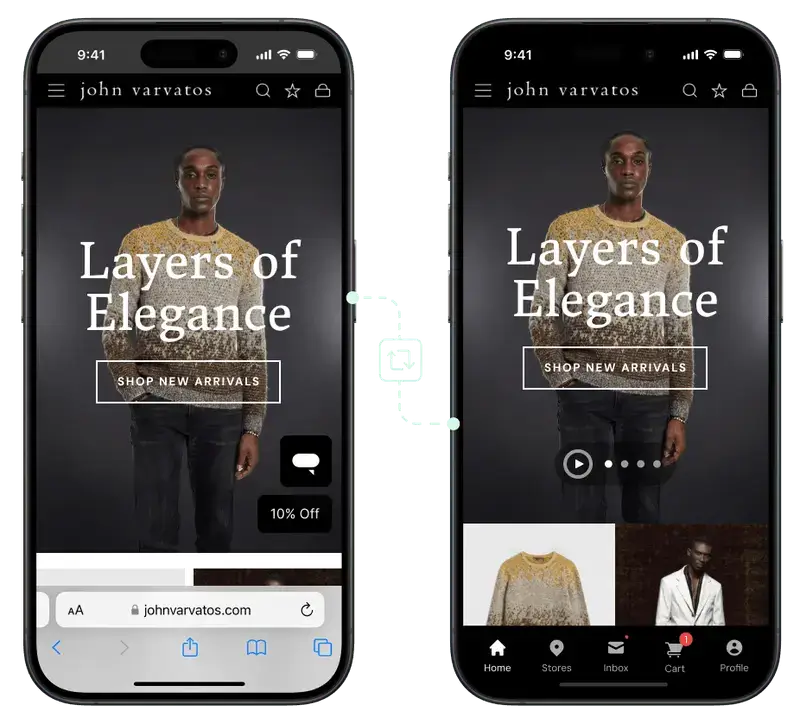
A WebView is a native component that displays web content inside an app.
Apple provides WKWebView, while Android provides the WebView class. Both let developers place a web-powered experience inside a native interface.
Unlike a normal browser, the user doesn't see an address bar, tabs, or bookmarks. The WebView becomes part of the app's layout.
A WebView app can be very simple, but it doesn't have to be. The native layer can add:
- Tab bars and navigation controls
- Push notifications
- Deep links
- Splash screens and loading states
- Native sharing and authentication flows
- Camera, location, and other device features
- Communication between web content and native code
That last part is often called a native bridge. It lets the website trigger native functions and lets the native app pass information back to the web layer.
It needs to be designed carefully, particularly when the WebView can load content the app owner doesn't control.
Native App vs WebView App: Key Differences
| Area | Native app | WebView app |
|---|---|---|
| Main interface | Built with platform-specific or cross-platform mobile code | Rendered from web content inside a native shell |
| Existing website reuse | Usually requires the experience to be rebuilt | Can reuse much of an existing responsive website or web app |
| UI control | Deep control over platform-specific interactions and animation | Strong for standard web, content, account, and commerce flows; complex mobile interactions may need native work |
| Performance | Best fit for graphics-heavy, computation-heavy, or highly interactive experiences | Can perform very well for content and commerce, but depends heavily on the website, network, and WebView implementation |
| Device features | Direct access to the full platform API surface | Access through the native shell, plugins, or a bridge; support depends on the implementation |
| Offline use | Can support extensive offline behavior when it is deliberately built | Remote web content normally needs a connection, although local assets and selected data can be cached |
| Updates | App-code changes usually go through an app-store release | Website changes can appear immediately; native-shell changes still need a store update |
| Best fit | Mobile-first products, advanced device integration, complex offline workflows, games, intensive media | Established websites and web apps whose core experience already works well on mobile |
How a WebView App Works
A production WebView app normally has three layers:
- The existing web experience. This provides pages, content, products, checkout, accounts, and other web functionality.
- The WebView. This renders the web experience inside the installed app.
- The native shell. This handles app navigation, push notifications, deep linking, permissions, loading states, and other mobile-specific behavior.
The balance can vary. One app might use WebViews only for a few content-heavy screens. Another might use the website for most customer-facing screens and rely on native components around it.
Shopify's engineering team, for example, has publicly described using WebViews as part of its mobile strategy.
That's a useful reminder that "native" and "WebView" aren't always two sealed boxes. Mature apps often combine approaches screen by screen.
What WebView Apps Do Well
Reuse an Existing Web Experience
This is the main advantage.
If you've already invested in a responsive website, custom checkout, account area, loyalty program, content system, and third-party integrations, a WebView approach can carry much of that work into the app.
It won't guarantee that every feature works without adjustment. Authentication handoffs, popups, downloads, payment flows, external links, and permission-based features often need app-specific handling.
Even so, the starting point is very different from rebuilding every screen and integration in mobile code.
Keep Web and App Changes in Sync
When the WebView loads your live website, changes to products, content, navigation, and many customer-facing features can appear in the app without a separate mobile release.
Native-shell changes are different. Adding a new native SDK, changing permission behavior, or modifying app-level navigation may still require an update through Apple and Google.
Reduce Duplicate Work
A web-first team can keep working in the systems it already uses rather than running a separate mobile product for every website change.
That can reduce development and QA work, especially for ecommerce stores and content businesses with frequent updates. The savings depend on how much of the existing experience is suitable for mobile and how much native customization the app still needs.
Preserve Complex Web Functionality
WebView apps can be a strong fit when the website has features that would be expensive or awkward to recreate through mobile APIs.
For an ecommerce store, that might include a customized checkout, regional storefront logic, subscriptions, loyalty features, product personalization, or a large collection of third-party scripts.
Reusing what you’ve already built on your site is often more practical than rebuilding and maintaining parallel versions of what is, essentially, the same thing.
Where WebView Apps Can Struggle
The Website Still Has to Be Good on Mobile
A WebView doesn't fix a slow or awkward mobile website. It exposes it.
If pages load slowly, buttons are hard to tap, layouts shift, or important flows rely on browser-specific behavior, those problems will follow users into the app. The web experience needs to be responsive, fast, and tested inside the actual iOS and Android shells.
Network Dependence
When most screens come from a remote website, the app normally needs a working connection. Developers can cache assets and create offline states, but a WebView app doesn't become offline-first simply because it is installed.
That may be fine for shopping, news, and account-based services that depend on live server data anyway.
It only really becomes a problem for field tools, travel apps, note-taking products, or anything where the user’s expectation is that it should work without an internet connection.
(and realistically, in many areas of the world you’re rarely without an internet connection today anyway).
Complex Mobile Interactions
Web technologies handle a wide range of interfaces well. They’re less natural for some highly interactive mobile experiences, including advanced gesture systems, real-time 3D graphics, augmented reality, or deep background processing.
You can add native screens or bridge to platform APIs, but each addition reduces the simplicity that made the WebView route attractive in the first place.
Security Needs Careful Design
WebViews can communicate with native code, which is powerful and sensitive.
Android's documentation warns against exposing native interfaces to untrusted HTML or allowing uncontrolled navigation inside a bridged WebView.
Teams need clear rules about which domains the app can load, what data can pass through the bridge, how authentication works, and which external links should open in the system browser.
What Native Apps Do Well
Native development offers the most control over the app itself.
It's the stronger route when you need:
- Detailed platform-specific interface behavior
- Complex animation or graphics
- High-performance local processing
- Deep access to Bluetooth, NFC, camera, sensors, or background services
- Robust offline workflows and local data management
- A mobile experience that is fundamentally different from the website
The tradeoff is the amount of product work involved. You are designing, building, integrating, testing, releasing, and maintaining a separate app experience.
Cross-platform frameworks can reduce duplication, but they don't remove the work of building the product.
Where React Native and Flutter Fit
React Native and Flutter sit between platform-specific development and WebView-heavy development.
React Native renders to native platform components and lets developers share JavaScript or TypeScript code across platforms. Flutter uses Dart and its own rendering system to produce natively compiled, multi-platform apps from a shared codebase.
Both can be good options when you need a custom mobile interface but want to reuse more code across iOS and Android. They still require a mobile development team, app-specific integrations, QA across platforms, and ongoing release management.
This is why the choice is better framed as a spectrum:
- Platform-specific native code for maximum platform control
- Cross-platform native frameworks for a shared custom app
- Hybrid or WebView architecture for web reuse plus native features
Most business apps land somewhere along this spectrum. The right point depends on how much of your existing website you want to reuse, and how much of the mobile experience needs to be built from scratch.
Can WebView Apps Get Into the App Store?
Yes, but using a WebView doesn't guarantee approval.
Apple's App Review Guideline 4.2 says an app should include features, content, and UI that elevate it beyond a repackaged website.
That means a basic wrapper with little utility or app-specific value may be rejected.
In short: if your app is simply a “website in a box”, do not expect to get it into the app store.
However, if you actually build an app experience, with reliable navigation, appropriate loading and error states, working links and authentication, useful native features, accurate store metadata, and enough value to justify the app's presence - there’s no reason you can’t get your app published.
A native codebase isn't an approval guarantee either. Every app still has to meet Apple's and Google's rules on functionality, privacy, payments, content, and quality.
It’s not as simple as WebView vs native.
How to Choose Between Native and WebView for Your Project
So how can you know whether it’s worth building a fully “native” app, or a WebView-based app? Here are a few quick points to help you decide.
Choose native or cross-platform native development when:
- The app is the product, rather than another channel for an existing web business.
- The mobile experience needs to be designed independently from the website.
- Advanced hardware access, graphics, background processing, or offline behavior is central to the product.
- You have the team and budget to operate a separate mobile codebase over time.
Consider a WebView approach when:
- Your website or web app already handles the core customer experience well.
- Rebuilding the same features and integrations would create a large amount of duplicate work.
- The experience is mainly commerce, content, accounts, bookings, or other web-friendly functionality.
- You want website changes to flow into the app without managing parallel releases for every update.
One question usually gets to the heart of it: Does the app need to be a fundamentally different product from the website?
If it does, custom mobile development may be worth the investment. This includes app-first products, like a ride-sharing app or something else where people typically aren’t accessing you via the web.
But if you already have a website, and both website and app have the same core idea (like with an ecommerce store), the more efficient way is typically to reuse what you’ve already built.
The Bottom Line
Native apps build the experience in mobile app code. WebView apps reuse web content inside a native shell. But both can give you a fast, beautiful, clean app experience.
Native development gives you more control and the broadest access to the platform. A WebView approach gives you more code reuse and can be much easier to keep aligned with an existing website.
The label alone doesn't tell you whether an app will be good. A poorly designed native app can be slow and frustrating. A well-engineered WebView app can feel cohesive and app-like. Start with the experience you need, the systems you already have, and the work you're prepared to maintain after launch.

Andrew Buck
Head of Content
Andrew is a content marketer with close to 10 years' experience creating digitally-native content. He has written extensively on topics related to Shopify, Amazon, ecommerce and digital marketing, drawing on previous experience in high-traffic retail and customer service. He started his marketing career with LandingCube, a SaaS tool for Amazon sellers, and has since progressed to work with numerous successful startups, creating helpful and engaging content, which has been referenced in thousands of publications, including Forbes, the New York Times, and many more leading websites. Now, Andrew runs all content operations for MobiLoud.