Every mobile app Shopify makes, including its Shop app and Point of Sale, is built with React Native. Each feature is built once for both iPhone and Android, and the company’s engineering team wrote in January 2025 that keeping the two platforms level on features is no longer a problem.
That approach used to sound like a compromise. Now Microsoft builds Outlook and Teams the same way, Google builds Google Pay with Flutter and Discord moved its Android app to React Native in 2022.
Cross-platform app development means one team and one codebase shipping to both the App Store and Google Play. The harder question today is which framework to use, because React Native, Flutter, Kotlin Multiplatform, .NET MAUI and Ionic share code in very different ways.
This guide covers how cross-platform development works, where it beats native (and where it doesn’t), how the main frameworks compare and how to take an app from scope to launch.
What Cross-Platform App Development Means
Cross-platform app development is a way of building one mobile app that runs on both iOS and Android from a single, shared codebase. A framework such as React Native or Flutter turns that code into an iPhone app and an Android app.
Native development builds the same app twice. The iOS version is written in Swift (or the older Objective-C) and the Android version in Kotlin (or Java), usually by two separate teams.
Every app has a list of features to build, from sign-in and search to checkout, push notifications and account settings. A cross-platform team builds each one once and ships it to both stores.
In practice, that means:
- One codebase instead of two
- One team instead of two
- One set of features that ships to both platforms at the same time
- One maintenance roadmap instead of two parallel ones
To the people using it, the result is a normal app they download from the App Store or Google Play. Most can’t tell whether it was built cross-platform or natively, and for most apps there’s no reason they’d need to.
How Does Cross-Platform Development Work?
Cross-platform frameworks all share code between iOS and Android, but they share different layers of the app. Some share every screen, and some share only the logic underneath.

There are four main approaches:
- Shared code, native components. React Native and .NET MAUI let you write the interface once, then show it with each platform’s own buttons, lists and text fields.
- Shared code, its own rendering engine. Flutter draws every pixel itself, so the app looks the same on both platforms.
- Shared logic, native or shared screens. Kotlin Multiplatform shares the business logic, such as data, networking and rules, and lets you build each platform’s screens natively or share them with Compose Multiplatform.
- Web code in a native shell. Ionic with Capacitor runs web code (HTML, CSS and JavaScript) inside a native app, with plugins for device features.
Every framework also lets you drop down to native code when the shared layer can’t do something, such as a new iOS feature on launch day.
No-code and low-code builders, such as Adalo, FlutterFlow, Glide, Bubble and Thunkable, are a different way to do it. You get a cross-platform app with these platforms too, but you build the app by dragging in components and wiring up data visually, instead of writing code.
FlutterFlow can export real Flutter code, while most of the others keep the app on their platform.
Cross-Platform vs Native App Development
Native and cross-platform development are the two main ways to build a mobile app, and they differ most in cost, speed and how close you get to the phone’s hardware.
| Native | Cross-platform | |
|---|---|---|
| Codebase | Two separate codebases, one for iOS and one for Android | One shared codebase |
| Languages | Swift for iOS, Kotlin for Android | JavaScript or TypeScript, Dart, Kotlin, C# or web code, depending on the framework |
| Cost | Highest | Roughly half of native |
| Time to launch | 6+ months | 3 to 9 months |
| Performance | The best possible | Near-native for most apps |
| New iOS and Android features | Available on day one | Often wait for the framework, or need some native code |
| Best suited to | Apps with high performance demands: 3D games, AR and advanced camera work | Most consumer, ecommerce, content and B2B apps |
Native is the obviously right answer only when your app depends heavily on performance or the phone’s hardware. Snapchat-style AR filters, console-quality 3D games and specialized camera processing are the usual examples.
For everything else, including most ecommerce, content, SaaS and community apps, cross-platform delivers an experience your users can’t tell apart from native, whether it’s built with React Native or with Flutter.
What Are the Benefits of Cross-Platform App Development?
Cross-platform app development comes down to three practical benefits for a product team: a lower bill, one consistent app and simpler upkeep.
1. It Costs Roughly Half as Much, and Ships in Half the Time
Building natively means paying for two apps. A custom ecommerce app alone can cost anywhere from $30,000 to $250,000 or more, and most native projects take six months or more.
A shared codebase cuts both numbers. One codebase means one team, one timeline and one budget instead of two, which for most teams works out at roughly half the cost and half the time.
Hybrid approaches that reuse an existing website cut even more, sometimes 80 to 90%.
That isn’t a small difference. It’s the difference between launching an app this quarter and launching it next year, or between justifying the project at all and shelving it.
2. You Get One App Experience, Not Two Drifting Ones
Separate iOS and Android teams tend to drift apart. A feature ships to iOS first, and the Android version follows three weeks later with a slightly different design and one missing setting.
The next sprint, the gap widens. Six months in, your two apps feel like two different products.
Cross-platform development removes that drift by design. The same team ships to both stores from the same codebase, so iPhone and Android users get the same features at the same time and the same experience when they need support.
"Not having to build the same features twice has given us a step change in productivity."
For brands, that consistency makes the app feel like part of the company, rather than a separate product line your customers happen to share.
3. Long-Term Maintenance Costs Half as Much
App maintenance costs 15 to 25% of the original build cost every year, by a common rule of thumb. That covers OS updates, security patches, bug fixes, new features and whatever Apple and Google change next.
If your apps cost $300,000 to build natively, that’s $45,000 to $75,000 a year, every year, to keep them running. Cross-platform halves that bill too, with one codebase to maintain and one set of updates to ship.
The math gets better when you count how often Apple and Google push platform changes that need an app update. Each one hits twice with native and once with cross-platform.
What Are the Downsides of Cross-Platform Development?
Cross-platform development has real limits, and they show up most in apps that push the phone’s hardware or need new platform features quickly.
- Hardware-heavy apps still run better natively. 3D games, AR and real-time video processing need every bit of performance and direct access to the hardware.
- New iOS and Android features can arrive late. When Apple or Google ships a new API, the framework or a plugin has to support it before your shared code can use it, unless you write that part natively.
- You’ll still write some native code. Widgets, watch apps and some payment and hardware SDKs need platform code. Even Shopify, one of the biggest React Native users, says native is still the best way to build cutting-edge features that use the device’s hardware.
- You depend on the framework’s roadmap. Upgrades can be big projects, and a framework can be retired: Xamarin’s end of support in May 2024 left its users migrating to .NET MAUI.
- Platform look and feel takes care. A Flutter app doesn’t pick up each platform’s design automatically, and a web-based app needs native navigation to feel like an app rather than a website.
Which Frameworks Are Used to Build Cross-Platform Apps?
React Native and Flutter are the two most widely used cross-platform frameworks. In Stack Overflow’s 2024 Developer Survey, the last edition to ask about them, 9.4% of respondents had done extensive work in Flutter over the past year and 8.4% in React Native, compared with 3.1% for .NET MAUI and 2.5% for Ionic.
Kotlin Multiplatform is smaller but growing quickly. Here’s how the five main frameworks compare.
| Framework | Language | How it works | Performance | Best suited to |
|---|---|---|---|---|
| React Native (Meta) | JavaScript or TypeScript, with React | Shared components shown as each platform's native interface elements | Near-native for most apps | Teams with React web developers, apps that should feel native on each platform |
| Flutter (Google) | Dart | Draws every pixel with its own engine, so it looks the same everywhere | Near-native, strong on custom animation | Brand-led apps with a custom design |
| Kotlin Multiplatform (JetBrains) | Kotlin | Shares logic; screens native (SwiftUI, Jetpack Compose) or shared with Compose Multiplatform | Native, wherever the screens are native | Android teams adding iOS, or native apps moving to shared code bit by bit |
| .NET MAUI (Microsoft) | C# and XAML | Shared controls shown as each platform's native controls | Near-native | .NET teams and business apps that also run on Windows and macOS |
| Ionic with Capacitor (OutSystems) | HTML, CSS and JavaScript, with Angular, React or Vue | Web screens inside a native shell, with plugins for device features | Good for content and forms, weaker on heavy graphics | Web teams, content apps and business apps |
React Native
React Native is Meta’s open-source framework for building iOS and Android apps with JavaScript or TypeScript and React, the library most web teams already use. Its components render as each platform’s native interface elements, so the app behaves like an iOS app on iPhone and an Android app on Android.
Since version 0.82, released in October 2025, every React Native app runs on the New Architecture, which replaced the old asynchronous bridge between JavaScript and native code. The React Native team now recommends starting new apps with a framework like Expo.
Microsoft uses React Native in Office, Outlook and Teams, and all of Shopify’s mobile apps are built with it. Discord moved its Android app to React Native in 2022.
React Native is best suited to teams with React developers. Our React Native vs Flutter comparison goes deeper.
Flutter
Flutter is Google’s open-source framework, written in the Dart language. Instead of using each platform’s interface elements, it draws every pixel itself with its own rendering engine, Impeller, which is the default on iOS and Android.
That gives designers full control and makes the app look the same on every platform. It also means the app doesn’t automatically take on the look of iOS or Android, so the team decides how platform-like it should feel.
Google builds Google Pay, Google Earth and NotebookLM with Flutter, and the Flutter showcase includes BMW, Nubank and Alibaba’s second-hand marketplace app.
Flutter is ideal for brand-led apps with custom design and animation. Our Flutter 101 guide covers how it works.
Kotlin Multiplatform
Kotlin Multiplatform (KMP), from JetBrains, shares the business logic of an app, such as data, networking and rules, in Kotlin. Each platform’s screens can stay fully native, in SwiftUI on iOS and Jetpack Compose on Android.
Sharing the screens is optional. Compose Multiplatform, also from JetBrains, became stable for iOS in May 2025, so teams can write the interface once too.
KMP’s share among cross-platform developers more than doubled, from 7% in 2024 to 18% in 2025, according to JetBrains’ State of Kotlin 2026 report. Google uses it for shared logic in Google Docs on Android, iOS and the web, and the Kotlin case studies include Netflix, Forbes, Cash App and McDonald’s.
KMP is a strong fit for teams with Android developers, or with a native app they want to move to shared code gradually. See how it compares in our Flutter vs Kotlin breakdown.
.NET MAUI
.NET MAUI (Multi-platform App UI) is Microsoft’s framework for building iOS, Android, macOS and Windows apps from one C# and XAML codebase. You write the controls once, and they appear as each platform’s native controls.
It replaced Xamarin, whose support ended on May 1, 2024. If you still see Xamarin recommended, the advice is out of date.
Microsoft’s .NET MAUI showcase includes NBC Sports Next’s SportsEngine team management app and Microsoft’s own Azure mobile app. MAUI is best suited to companies that already work in C# and .NET, especially for business apps that also need to run on desktop.
Ionic and Capacitor
Ionic is a toolkit of web interface components, and Capacitor is the native runtime that packages a web app as iOS and Android apps, with plugins for the camera, push notifications and other device features. Teams build in HTML, CSS and JavaScript, often with Angular, React or Vue.
Ionic joined OutSystems in 2022, and in February 2025 it stopped selling its paid products, including the Appflow build service. Ionic Framework and Capacitor remain free and open source.
Burger King and Shipt use Ionic for their apps. It’s a strong fit for web teams and for content, booking and business apps.
Which Approach Is Right for Your App?
The right way to build a cross-platform app depends on what you’re building. A note-taking app, a shopping app and a game need very different things, and so does a team with a $50,000 budget compared with one that has mobile engineers in-house.
| Type of app | Best suited to | Why |
|---|---|---|
| Ecommerce and other web-first businesses | An app built on your website, like MobiLoud's | Your website already does most of what the app needs, so you extend it instead of rebuilding it. |
| New consumer apps with no website behind them (social, fintech, travel) | React Native or Flutter | You're building from scratch, the experience is the product and you need full control over every screen. |
| SaaS and B2B dashboards that already run on the web | Either an app built on your website, or a framework | A responsive web app can go straight into the stores with push notifications; a framework makes sense if mobile is a top-priority channel with its own experience. |
| Games, AR and hardware-heavy apps | Native (Swift and Kotlin) | They need direct access to graphics, sensors, Bluetooth and real-time video. |
| Internal tools, event apps and MVPs | No-code builders | The audience is small, the app doesn't need to scale and it has to be live next week. |
| Simple public apps from web-first teams | Ionic with Capacitor | Your React, Angular or Vue developers can ship it without hiring mobile specialists. |
Which Framework Suits Your Team?
If you’re writing the app in a framework, the right one depends mostly on the skills your team already has, and on how native each screen needs to feel.
- Your team builds with React: React Native, started with Expo.
- You want a custom design that looks the same everywhere: Flutter.
- You have Android developers, or a native app you want to share code across: Kotlin Multiplatform.
- You work in C# and .NET, or the app also needs to run on Windows: .NET MAUI.
- You have a web team and a web app: Ionic with Capacitor.
- Your website already does what the app needs to do: build the app on top of your website, covered below.
- The app is built around the phone’s hardware: native Swift and Kotlin.
How Do You Build a Cross-Platform App?
Building a cross-platform app follows the same arc whichever framework you choose: scope it, design it, build it, test it, publish it and keep it up to date. Here’s what to expect at each stage.
1. Scope the App
Start by getting clear on what the app actually does: who uses it, which screens it needs, which features matter on day one and which can wait for version two. A short feature list and rough wireframes are enough to begin.
The most common mistake here is scope creep, trying to ship everything at once instead of a focused first version. If you’re turning a website into an app, scoping is mostly about the small changes the app needs compared with your site, because the core features already work there.
2. Design for Both Platforms
Design covers how the app looks and how it feels to use, and for a cross-platform app, how platform-specific you want it to be. iPhone users expect a bottom tab bar, swipe-back gestures and Apple’s visual conventions, while Android users expect their own patterns.
Flutter makes the app look identical on both platforms, while React Native picks up each platform’s native components. Expect two to six weeks of design work for a custom framework build, plus time for feedback and revisions.
3. Build It in Short Cycles
Development is the longest phase, and the one where timelines differ most between approaches:
- A framework build in Flutter or React Native typically runs three to nine months with a small team.
- A hybrid build with Ionic is usually faster, but can still take a few months.
- A no-code app can be built in days.
- An app from MobiLoud typically launches in 2 to 4 weeks, including design, build and app store submission.
Ask to see working builds regularly, not just at the end. Most teams work in two-week sprints with a demo at the end of each, which catches misunderstandings early.
4. Test on Real Devices
Cross-platform apps need testing on real phones, not just simulators. Android’s range of devices is the biggest pitfall: an app can run perfectly on a new Pixel and crash on a three-year-old Samsung, so test on a spread of devices, screen sizes and OS versions.
This is also where performance problems show up, like janky animations, slow scrolling lists and laggy transitions. Beta testing tools help you get builds onto testers’ phones: TestFlight on iPhone, and Google Play’s own testing tracks on Android.
5. Submit to the App Store and Google Play
Both stores review your app before it goes live. Apple handles most reviews within a day or two, and first-time submissions are often sent back for incomplete information, broken sign-in flows or missing privacy details.
Our guide to App Store and Google Play requirements covers what each store asks for in 2026, and the pitfalls that get apps rejected.
6. Keep It Up to Date
Launch is the start, not the finish. Apple and Google release new versions of iOS and Android every year, the libraries you depend on change, and users find bugs and ask for features.
Plan for ongoing development from day one. This is where cross-platform pays off again, because one team ships one update to both stores.
Do You Need a New Codebase at All?
A business that already has a working website may not need a new codebase for its app. That’s especially true of ecommerce sites, marketplaces and publishers, where the app and the website do more or less the same thing.
For those businesses, a React Native or Flutter app is still a lot of unnecessary work. You’d be rebuilding your website in a new framework, which brings back the two-codebase problem, this time with your website and your app.
MobiLoud takes a different cross-platform route. It builds your native iOS and Android apps on top of the website you already have, adding a native layer with native navigation and push notifications. To your customers, it’s no different from a custom app built from scratch.
Whether you’re on Shopify, BigCommerce, WooCommerce or a custom-built site, you can go live without a new codebase in a new framework. MobiLoud’s team builds, publishes and maintains your app, and launch typically takes 2 to 4 weeks.
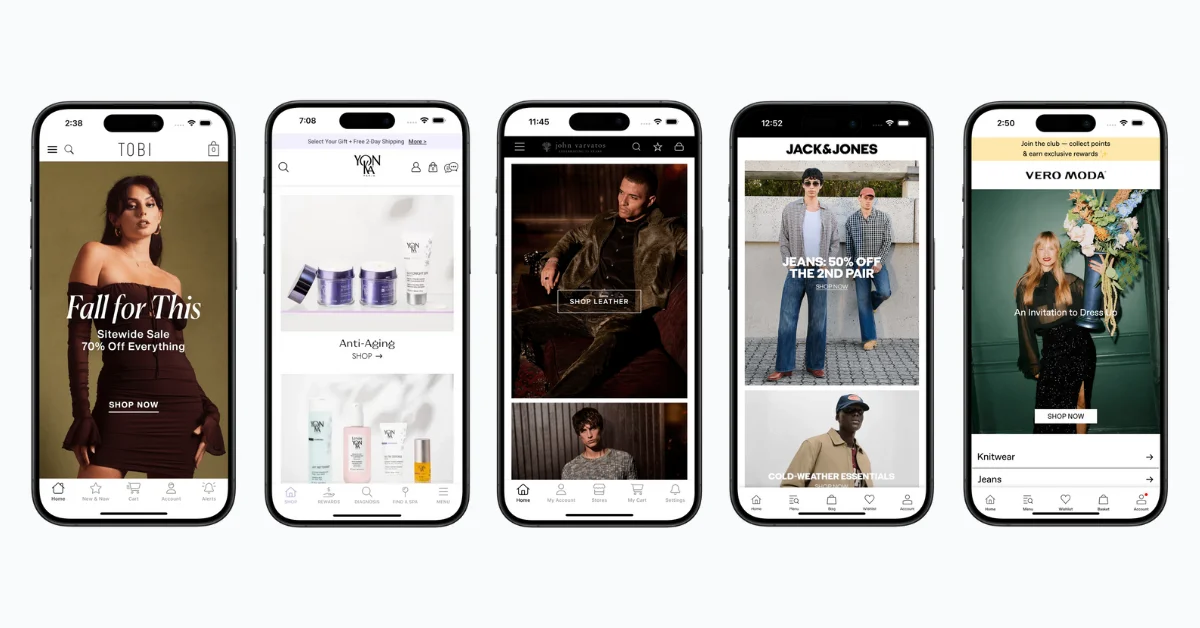
You keep managing content and design in the systems you already use, and every change to the site shows up in the app. One codebase serves three platforms: web, iOS and Android.
"If we had unlimited time and money, we would probably go for a custom native app, but that is half a million to a million a year to maintain."
MobiLoud pricing starts at $1,499 a month, with a one-time setup fee and no revenue share.
It isn’t the right route for every app. A new product with no website behind it, or an app built around the phone’s hardware, is better served by one of the frameworks above or by native code. See the kinds of brands that use MobiLoud on our case studies page.
The Bottom Line: Should You Build Cross-Platform?
For a small minority of apps, those that need deep hardware access or top-tier 3D graphics, native development is still the right answer.
Most of the time, though, cross-platform development is the better economic and operational choice: one codebase, one team, one launch, lower cost, faster shipping and easier maintenance.
If you’re building an app from scratch, look at React Native or Flutter, unless there’s something you really can’t do with them (which is unlikely). Kotlin Multiplatform and .NET MAUI are the natural picks for teams that already work in Kotlin or C#.
If your goal is to turn (or extend) your website into a native app, go with MobiLoud. You’ll save months of work and hundreds of thousands of dollars in development costs, and end up with an app that does everything you need and takes much less work to maintain.
Want to see what’s possible? Get a live, interactive preview of your website as an app, for free.